AI Prompts for Conversion Optimization: 8 Prompts to Turn More Enquiries Into Customers
Researchers once sent a simple enquiry to 2,241 US companies through their websites. Almost a quarter never replied at all. The ones that did reply within a month took 42 hours on average.
That test was published in Harvard Business Review in 2011, and a lot has changed since. The problem it found is still easy to recognise. For a business that quotes, many customers are lost after they get in touch: a slow reply, a quote that misses the point, a follow-up nobody sends.
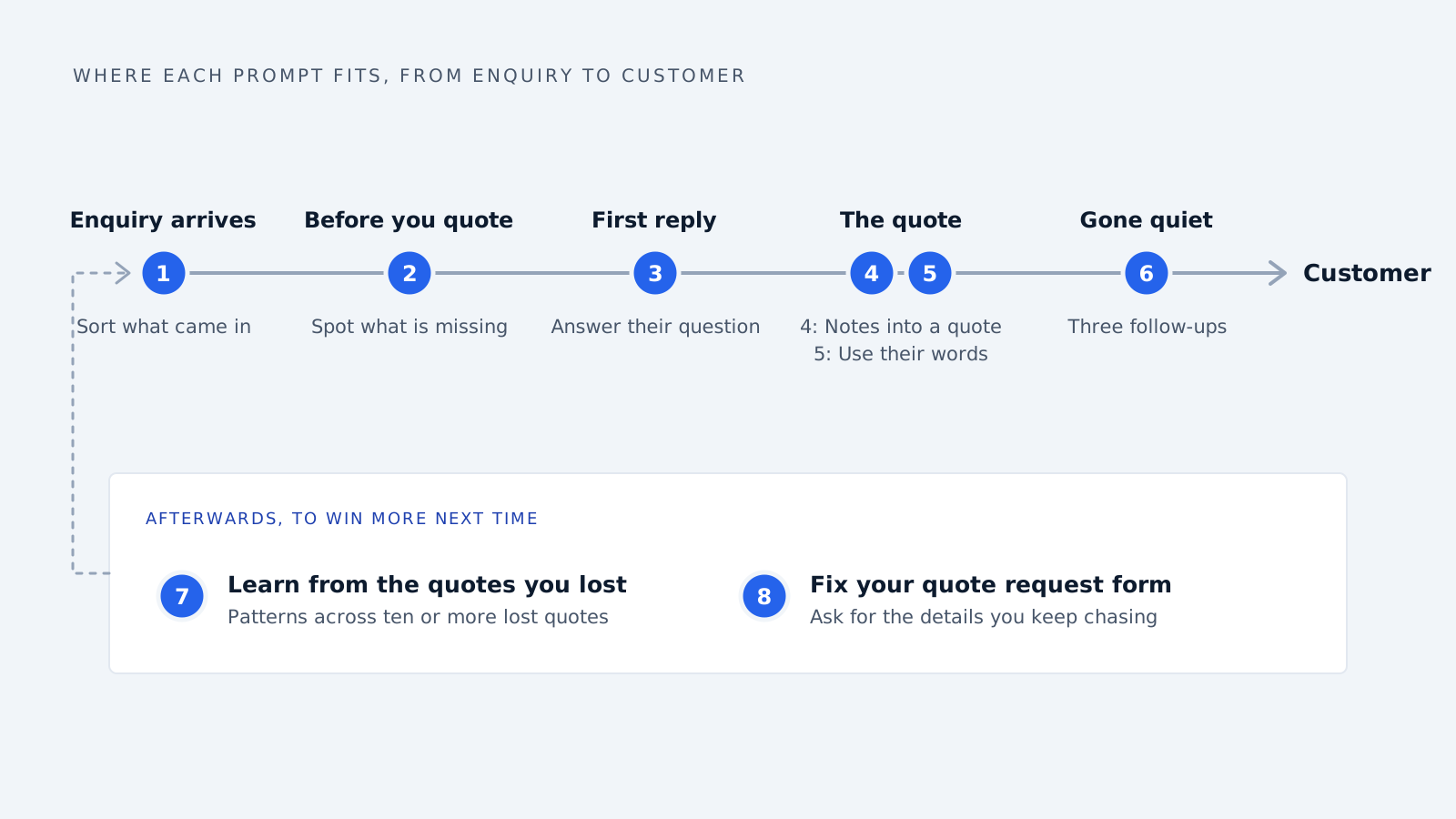
Most conversion optimization advice is about web pages, buttons and colours. This article is about the part after someone gets in touch. Below are eight AI prompts you can copy and paste, one for each moment where an enquiry turns into a customer or slips away.
Before you use any of them
Take out names and contact details first. Replace the customer’s name with “the customer” and remove email addresses, phone numbers and anything private. Use a paid business account if you can. Our tips for using AI in your business explain why.
Give it the facts. AI fills any gap with something that sounds right. If you do not give it your price, delivery time or stock level, it may invent one.
A person reads it before it is sent. Every prompt here writes a draft. You check it and press send.
1. Sort what came in
Use this when your inbox mixes real buyers with suppliers, newsletters and spam.
Below is an email our business received. Sort it into one of these:
- New customer enquiry
- Existing customer
- Supplier or salesperson pitching to us
- Automated email (receipt, newsletter, notification)
- Spam

Then give one sentence explaining why, and if it is a new
enquiry, list what they are asking for.

Email:
[PASTE EMAIL, WITH NAMES AND CONTACT DETAILS REMOVED]
Watch out for: automated emails that look like enquiries. When we built Delynt’s email sorting, a payment receipt and a couple of automated job alerts got through during live testing as if they were leads. The opposite happens too: a real buyer who writes oddly can land in the wrong pile. So never let AI delete anything. Use it to sort, and glance at what it puts in the “not a lead” pile.
2. Spot what is missing before you can quote
A lot of quote delays come from going back and forth for details. This prompt finds every gap in one go, so you only have to ask once.
I need to send a price quote for this enquiry. Here is what I
need to know before I can quote: [LIST, e.g. quantity, size,
material, delivery address, deadline].

Read the enquiry and tell me:
1. What they have already told me
2. What is missing
3. A short, friendly reply asking for only the missing details,
   in one email

Enquiry:
[PASTE ENQUIRY]
Here is what that looks like with a made-up enquiry:
Enquiry: “Hi, we need around 200 brackets for a balcony railing job. Can you quote? We need them before the inspection on the 20th.”
Already told you: about 200 brackets, for a balcony railing, needed before the 20th.
Missing: material and finish, size or a drawing, exact quantity, delivery address.
Reply: “Happy to quote for the railing brackets, and the 20th should be workable. So I can price them exactly, could you send the size or a drawing, the material and finish you need, the exact quantity, and the delivery address?”
One email instead of four. If the customer sent a long specification or drawing, paste the text and add: “List every requirement that affects price or delivery time.” Check first that the document is not covered by a confidentiality agreement.
3. Write a first reply that answers their question
Speed matters. The same Harvard article looked at 1.25 million leads and found that firms who contacted a lead within an hour were nearly seven times as likely to qualify it as firms that waited an hour or more. In plain terms, quick replies turned into real sales opportunities far more often.
A fast reply that does not answer anything does not help, though. This prompt keeps it short and useful:
Write a reply to this enquiry from our business, [BUSINESS NAME],
which [WHAT YOU DO].

Rules:
- Answer the question they actually asked first
- Ask no more than two questions
- Under 120 words
- Friendly and plain, no phrases like "thank you for reaching out"
- End with one clear next step

Facts you can use: [PRICES, LEAD TIMES, STOCK, ANYTHING RELEVANT]

Enquiry:
[PASTE ENQUIRY]
4. Turn your notes into a clear quote email
You know the price. The hard part is writing it up so the customer understands it at a glance.
Turn these notes into a short quote email.

Include:
- A one-line summary of what they asked for
- A simple table: item, quantity, price each, total
- Delivery time
- How long the price is valid
- One clear next step to accept

Use only the numbers I give you. If something is missing,
write [MISSING] instead of guessing.

My notes:
[PASTE YOUR PRICES, ITEMS, DELIVERY TIME, TERMS]
The line “write [MISSING] instead of guessing” matters. Without it, AI may fill a gap with a delivery date or a discount you never offered.
Before you send it, check every number against your price list, including the total.
5. Write the quote in their words
Customers describe what they need in their own way. A quote that uses their words feels like it was written for them.
Here is a customer's enquiry and my draft quote email.

Rewrite the quote so it:
- Uses the words the customer used to describe what they need
- Mentions the thing they seem to care about most
  (for example a deadline, a budget or a specific use)
- Keeps every price, quantity and date exactly the same

Enquiry:
[PASTE ENQUIRY]

My draft quote:
[PASTE DRAFT]
For example, if the enquiry says “brackets for a balcony railing, needs to be done before the inspection on the 20th,” the quote should mention the railing and the 20th, not just “200 x BRK-40.”
6. Follow up on a quote that went quiet
A quote that goes quiet is not always a “no.” The customer may be busy, comparing prices, or waiting for someone to approve it.
I sent this quote [NUMBER] days ago and have not heard back.

Write three short follow-up emails I can use if they stay quiet:
1. A friendly check-in after 3 days (under 60 words)
2. A follow-up after 10 days that adds something useful,
   such as an answer to a likely question or a delivery update
3. A polite final email after 3 weeks asking if I should close
   the quote

No pressure, no fake urgency, no guilt.

The quote:
[PASTE QUOTE]
7. Learn from the quotes you lost
Once you have ten or more lost quotes, AI can help you see a pattern you may have missed.
Below are notes on [NUMBER] quotes we lost. For each one I have
written what we quoted, how fast we replied, and any reason
the customer gave.

Find patterns. Put them in a table with:
- The pattern
- How many quotes it applies to
- What we could change

Only use what is in the notes. Do not invent reasons.

Notes:
[PASTE NOTES, WITH NO CUSTOMER NAMES]
Treat the answer as ideas to test, not facts. Ten quotes is a small sample, and AI can find patterns that are not there.
8. Fix your quote request form
If your website form keeps sending you enquiries you cannot quote from, the form is part of the problem.
Here are the fields on our website's quote request form, and five
real enquiries we received through it.

Tell me:
1. Which details we usually have to go back and ask for
2. Which fields we could add to get those details first time
3. Which fields we could remove because we never use them

Keep the form as short as possible while still getting what we
need to quote.

Form fields:
[LIST FIELDS]

Recent enquiries:
[PASTE 5 ENQUIRIES, NAMES REMOVED]
Check before you send
Whatever the prompt, run through this before anything goes to a customer:
| Check | Why |
|---|---|
| Every price, quantity and date matches your records | AI copies numbers wrongly and sometimes invents them |
| Nothing is promised that you cannot deliver | Discounts, delivery dates or guarantees can slip in |
| The customer’s question is answered | A polished email that misses the point still loses the deal |
| It sounds like you | If it would embarrass you read aloud, rewrite it |
Common questions
Can I paste customer emails into ChatGPT? Only after removing names, contact details and anything private, and ideally on a paid business account that does not use what you type to improve its AI.
Which AI tool works best for these prompts? Any of the main ones, such as ChatGPT, Gemini, Copilot or Claude. Run the same prompt with a real enquiry in two of them, and keep the one whose answers need less fixing.
Should AI send replies automatically? Not for quotes. Prices, dates and promises need a person to check them before they reach a customer.
What if the AI gets a price or date wrong? That is why prompt 4 tells it to write [MISSING] instead of guessing, and why a person checks every number before sending. Treat every figure in an AI draft as unchecked until you have compared it with your own records.
Prompt 1 is close to what Delynt does automatically. It checks every incoming email, filters out automated junk, and scores the rest with a written reason, so a person only sees the ones worth answering.
Delynt AI is AI email triage and response for businesses that sell out of a shared mailbox. It connects to Gmail, Google Workspace, Outlook and Microsoft 365, drops automated junk by rule before any model runs, scores what survives for trust and spam with a written reason, and drafts and sends replies under the approval rules you set. How it works
How we write, source and correct our articles:editorial policy.
Related reading
The Business Benefits of AI Agents and Automation
What AI agents measurably do for a business, what changed in 2026, where they still fail, and how to pick a first task that pays off.
10 Tips for Integrating Generative AI in Your Business
Ten simple tips for using AI tools like ChatGPT in your business, without leaking private information, sending out mistakes or wasting money.

How to Optimize Advertising Using AI
AI bidding buys what it can measure, which is usually form fills. Here's what the algorithm sees, which signals you control, and how to make it chase revenue.
Ready when you are
See it read your own sales mailbox
Twenty minutes, on a real mailbox, with no slides. Gmail, Google Workspace, Outlook and Microsoft 365.