How to Optimize Advertising Using AI

Turn on AI bidding and your cost per lead usually drops. A few weeks later your sales team tells you the leads are garbage.
Both things are true at once, and they are connected.
The AI learns from what it can measure. It sees a form get filled in within seconds. It never sees the deal you sign eight months later. So it gets very good at buying form fills, because that is the only scoreboard it has.
Most advice stops there and tells you to “optimise for revenue.” That skips the part that actually decides your results: what the machine can see in the first place, and which of those signals you control. That is where this article spends most of its time.
What the machine can actually see
Every AI bidding decision is made from a small set of signals attached to each auction. Knowing which ones exist, and which you can influence, is the whole job.
| Signal | Where it comes from | Can you act on it? |
|---|---|---|
| Search query or placement | The user | Yes, via keywords, negatives, feeds |
| Device type (computer, mobile, tablet, TV) | The browser | Yes, all campaign types |
| Device model, OS, carrier | The browser | Only in Demand Gen, Display and Video |
| Location and language | IP and settings | Yes |
| Time of day and day of week | The clock | Yes, via ad schedules |
| Browsing history and remarketing lists | Cookies | Partly, and shrinking |
| Who the user is | Your own customer data | Yes, and this is the durable one |
| What they typed into your form | Your own forms | Yes, and almost nobody does |
| Which page they converted on | Your analytics | Yes, and almost nobody does |
| Whether the lead became revenue | Your CRM | Yes, inside 63 to 90 days |
The first six are platform signals. You tune them. The last four are yours, and they are the ones that separate an account that improves from one that plateaus.
The cookie situation is not what you were told
For five years the industry prepared for third-party cookies to disappear from Chrome. On 24 April 2025 Google cancelled that plan. Third-party cookies are still in Chrome, and Chrome is roughly two-thirds of global browsing.
This does not mean the problem went away. Safari and Firefox still block third-party cookies by default, so a meaningful slice of your traffic has been cookieless for years regardless of what Chrome does. Remarketing lists under-count. Attribution windows break. The signal gets thinner on exactly the audiences that use those browsers.
The practical reading: you have more time than you were told, and the direction of travel has not changed.
The consent setting that silently starves your campaigns
If you get any traffic from the EEA, UK or Switzerland, Google requires Consent Mode v2. Most people install it, pick the default, and never look again. The default choice is the one that matters.
| Basic Consent Mode | Advanced Consent Mode | |
|---|---|---|
| User declines cookies | Tags do not load at all | Tags load, send cookieless pings |
| Data Google receives | None | Behavioural signals, no identifiers |
| Can Google model the missing conversions? | No | Yes |
Advanced mode sends a stripped-down ping with no identifiers when someone refuses cookies, which lets Google estimate what declined users did by modelling them against users who consented. Basic mode sends nothing, so those users are invisible. Modelled conversions are labelled as modelled in your reports.
If a large share of your European visitors decline cookies and you are on Basic, your campaigns are learning from a fraction of reality and your reported cost per conversion is wrong in a direction nobody can measure.
Device, time and the signals people ignore
Device type is available in every campaign type, and still worth checking even under automated bidding, because the gap between mobile and desktop conversion quality in B2B is usually large and usually ignored. Mobile often produces cheaper leads that close at a lower rate, which is precisely the trap described at the top of this article.
Device model, operating system and carrier can be targeted, but only in Demand Gen, Display and Video campaigns, not Search. This matters for consumer products where the handset implies something about the buyer, and for app promotion. For most B2B search accounts it is unavailable, so ignore advice that tells you to segment Search by phone model.
Time of day and day of week is the most under-used signal in B2B. If your sales team only answers the phone between 9 and 6 on weekdays, leads arriving at 11pm on Saturday convert far worse, and the algorithm has no idea your office is shut. Ad scheduling is how you tell it.
Time to purchase matters separately. Look at how long your conversions take after the click, not just how many there are. A business where most sales land in week three behaves differently from one where they land in month four, and it decides whether the 63-day or 90-day import window is survivable.
The two signals almost nobody feeds back
These are the ones that make the difference, and they require work rather than settings.
Which pages produce leads that actually close
Most accounts measure conversions by page. Very few measure quality by page. The pricing page, the comparison page, the free template and the contact form all produce leads, and they do not produce the same leads.
Tag each conversion with the page it came from, then look at what happened to those leads in your CRM three months later. It is common to find one page producing a third of your volume and almost none of your pipeline. That page is training your bidding algorithm, every day, to find more people like the ones who never buy.
Once you know, you have two moves: assign different conversion values by page, or stop counting the weak page as a conversion at all.
What people write in your form
This is the richest signal in the whole account and it sits unused in almost every business.
When someone fills in your form, they usually type something — a sentence about what they need, a company name, a rough timeline, sometimes a budget. That text predicts whether they will buy far better than the fact that a form was submitted. A message saying “we need 400 units by March, who do I speak to about pricing” is not the same event as “pls send info,” and your bidding algorithm currently treats them identically.
The method is straightforward:
- Capture the message text with the lead, along with the Google Click ID.
- Score it. Rules work for obvious things such as a free email domain, a message under five words, or a competitor’s name. A language model handles the rest, and it can write a one-line reason for each score so a human can audit it.
- Send the score back as the conversion value, so a strong enquiry is worth more to the algorithm than a weak one.
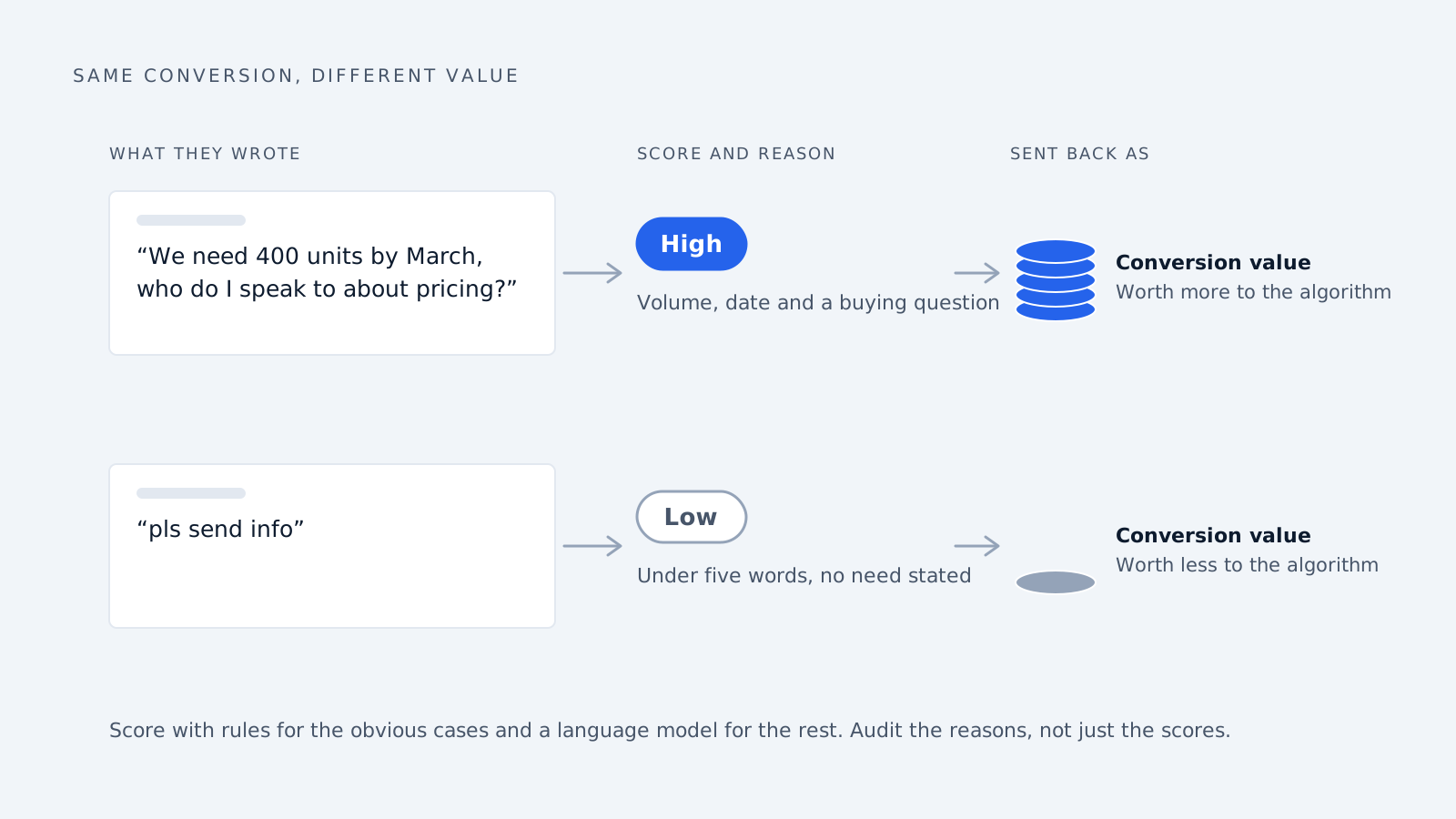
You are not adding a conversion. You are grading the ones you already have, so the system stops treating all form fills as equal. This is the cheapest available fix for the problem this article opened with, and it works even when your sales cycle is far too long to report closed revenue.
One caution: whatever you score on, the algorithm will chase. If your scoring rewards long messages, you will get long messages. Audit the reasons, not just the scores.
The three questions to ask before you automate
1. Do you get enough wins? Google’s yardstick is 30 conversions. Campaigns below that face a learning period of up to four weeks, and Google warns cost per acquisition can swing by up to 100% while volume is low. Meta ad sets generally need around 50 events in a rolling seven days to leave their learning phase.
2. Do those wins happen fast enough? Google only accepts a sale reported later if it happened within 90 days of the click, or 63 days with enhanced conversions.
3. Does the thing you count match the thing you want? A form fill is not money. If you count form fills, you will get form fills.
AI vs human optimization in B2B advertising
Whether B2B fails these checks depends on deal size, and most advice gets this wrong by treating all B2B the same.
| Deal size | Typical sales cycle | Fits inside the 90-day window? |
|---|---|---|
| Under $15K | 14–30 days | Yes |
| $15K–$100K | 30–90 days | Usually, just barely |
| Over $100K | 90–180+ days | No |
| Manufacturing deals | 130–379 days | No |
Those bands come from a review of sales-cycle benchmarks, which also found the widely-quoted “211-day average B2B sales cycle” traces back to one podcast remark about enterprise software. The same review puts median B2B SaaS at 84 days from a study of 939 companies. Treat these as rough bands.
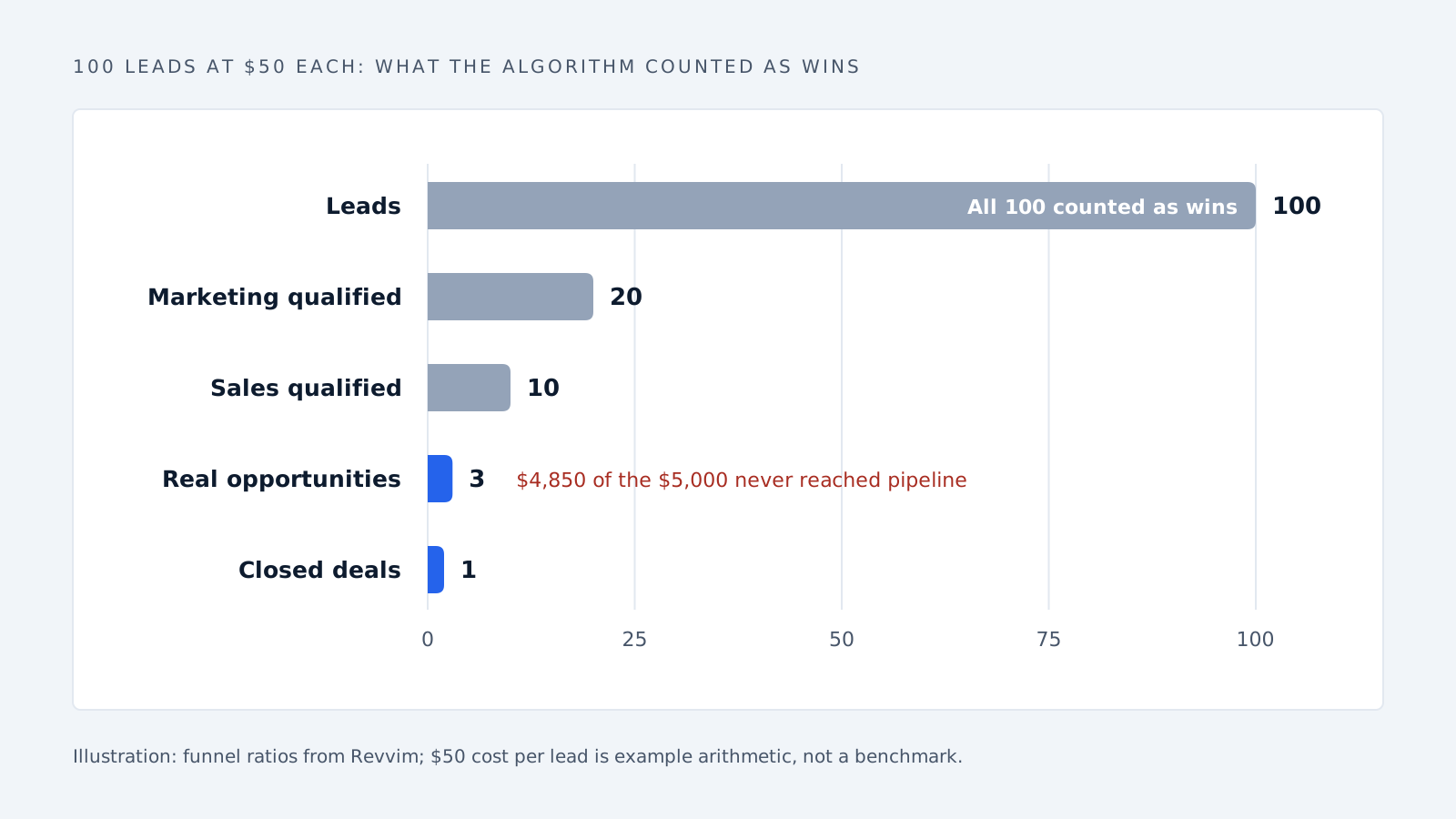
The volume problem applies to everyone. A typical funnel:
| Stage | How many |
|---|---|
| Leads | 100 |
| Marketing qualified | 20 |
| Sales qualified | 10 |
| Real opportunities | 3 |
| Closed deals | 1 |
That example is from Revvim, using a $10,000 average deal, and is one illustration rather than an industry average.
What it costs. Say your cost per lead is $50, which is arithmetic rather than a benchmark. A hundred leads costs $5,000, and three become real opportunities. So $4,850 bought conversations that never reached your pipeline, and the algorithm counted every one as a success and went looking for more.
The fix, and what it breaks
Pick a step further down your process that still happens within about two months, such as “this lead became a real opportunity,” and report that instead of the form fill.
- Save the Google Click ID when someone fills in your form, or switch on enhanced conversions.
- In your CRM, mark which leads reached that stage and what it is worth.
- Upload those back into Google Ads.
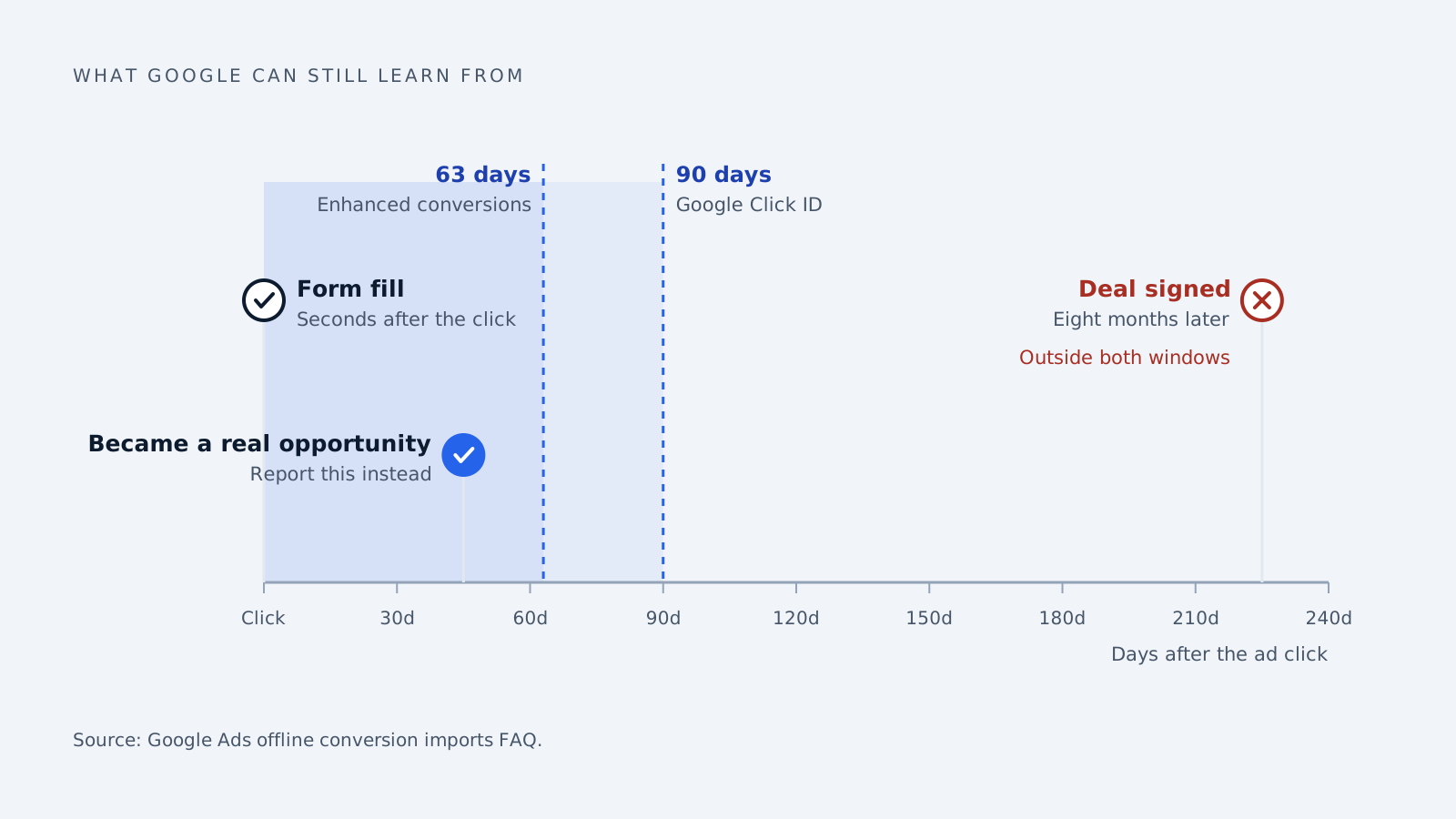
Use the Click ID rather than enhanced conversions if your cycle is long. Enhanced conversions are easier to set up, but close the window at 63 days instead of 90.
Expect performance to get worse first. Changing what you count restarts learning, your lead count drops because you asked for fewer and better leads, and your cost per conversion rises because you are counting a rarer event. All three are supposed to happen. Tell whoever reads the dashboard before you make the change, because this is where most people revert it and conclude AI bidding does not work.
How auto dealerships use AI to optimize digital advertising
Dealerships pass all three checks. Cars sell in weeks, volume is sufficient, and a lead on one specific vehicle is close to what the business wants.
The format. Google Vehicle Ads shows one car from your lot in search results with its price, mileage and your dealership name. It runs only through Performance Max, so there is no manual version.
The feed is the campaign. With bids and targeting automated, feed accuracy is the lever that remains.
| Every car in the feed needs |
|---|
| Its 17-character VIN |
| A price matching the price on the car’s page |
| Make, model, year, mileage, condition, colour |
| A main HTTPS photo, plus up to 10 more |
| The Google product category field |
Google suggests testing the feed, then updating daily or weekly. Google’s own test reported a 25% conversion lift for dealers adding Vehicle Ads, a figure from the company selling the format.
The real question is which cars to advertise. A vehicle on your lot costs money every day. One industry estimate puts holding costs at $30 to $40 per unit per day across floorplan interest, insurance and depreciation, with front-end gross often collapsing after 30 to 45 days and used vehicles entering a must-sell zone at 60. That source sells inventory software, so treat the numbers as vendor figures.
An algorithm optimising for cheap leads will favour fresh, popular vehicles and ignore aging stock that is costing you $35 a day. Feeding days-in-stock into your campaign structure, and weighting budget toward the cars that are bleeding, is a decision the algorithm cannot make because nobody told it a 50-day-old sedan matters more than a new arrival.
Where each business lands
| Small-ticket B2B | Enterprise B2B | Car dealership | |
|---|---|---|---|
| Enough wins to learn from | Sometimes | Rarely | Yes |
| Sale lands inside Google’s window | Yes | No | Yes |
| What you count matches what you want | After you fix it | Only partly, ever | Close enough |
| AI bidding works as-is | Nearly | No | Yes |
| Where human effort goes | Grading leads | Mid-funnel goals | Feed and stock age |
What to do next
Start by auditing signals rather than performance. Check which consent mode you are on, whether mobile leads close at the same rate as desktop, which pages produce leads that reach pipeline, and whether anyone has ever read the text people type into your forms.
Then fix what you count, in this order: grade your existing conversions by page and by message quality, then report a mid-funnel CRM stage if your cycle allows it, then turn automation loose.
Most bad outcomes from AI bidding are not the machine failing. The machine hit the target it was given, and nobody checked the target.
Common questions
How many conversions do you need for AI bidding to work? Google lets you start with none, but campaigns under 30 conversions face a learning period of up to four weeks, and Google warns cost per acquisition can swing by up to 100% while volume is low.
Are third-party cookies gone? Not in Chrome. Google cancelled the deprecation in April 2025. Safari and Firefox still block them, so part of your traffic has been cookieless for years.
Why are my automated campaigns bringing bad leads? Usually because every form fill counts as an equal win. Grade them, by landing page and by what the person actually wrote, and send the grade back as conversion value.
Should I use the Google Click ID or enhanced conversions? Enhanced conversions are simpler, but the window is 63 days against 90 for the Click ID. Long cycles favour the Click ID.
My results got worse after I changed the conversion action. Did I break it? Probably not. Changing what you count restarts learning and you are now counting a rarer event. Wait out the learning period and compare pipeline, not lead volume.
How we write, source and correct our articles:editorial policy.
Related reading
AI Prompts for Conversion Optimization: 8 Prompts to Turn More Enquiries Into Customers
Eight copy-and-paste AI prompts for the moments that win or lose a customer: the first reply, the quote, the follow-up and the lost deal.

The Business Benefits of AI Agents and Automation
What AI agents measurably do for a business, what changed in 2026, where they still fail, and how to pick a first task that pays off.

10 Tips for Integrating Generative AI in Your Business
Ten simple tips for using AI tools like ChatGPT in your business, without leaking private information, sending out mistakes or wasting money.
Ready when you are
See it read your own sales mailbox
Twenty minutes, on a real mailbox, with no slides. Gmail, Google Workspace, Outlook and Microsoft 365.