The Business Benefits of AI Agents and Automation
In 2024, Klarna said its AI assistant was doing the work of 700 customer service agents. A year later its CEO told Bloomberg that cost had weighed too heavily in the decision, and that “what you end up having is lower quality.” Klarna started hiring people again.
Both things were true, and the reason is the most useful thing to know before you pay for an AI agent.
The benefits are real, and they show up in some kinds of work and disappear in others. Below is the evidence, what changed in 2026, what broke when we built one, and four questions that tell you which kind of work you have.
A quick definition, and a warning about labels
An AI agent is software that takes a goal, decides the steps, and uses tools such as your email, CRM or calendar to carry them out. Ordinary automation follows steps you wrote and stops when something unexpected happens. An agent decides for itself, which makes it more flexible and more likely to take a wrong action.
Many products sold as agents are not agents. In June 2025 Gartner estimated that only about 130 of the thousands of vendors marketing “agentic AI” offer the real thing. The rest are chatbots, assistants and older robotic process automation with a new name. Gartner calls this agent washing.
What the research has measured
Most lists of AI agent benefits are written by companies that sell AI agents, and they rarely cite a study. The figures below come from controlled studies and published benchmarks. The column that matters most is the second one.
| What was measured | AI helping a person, or working alone? | Result |
|---|---|---|
| Customer support, 5,179 agents (NBER, 2023) | Helping a person | 14% more issues resolved per hour |
| Same study, new and lower-skilled staff | Helping a person | 34% more |
| Same study, experienced staff | Helping a person | Almost no change |
| Consulting, 758 BCG consultants, tasks AI is good at (2023) | Helping a person | 12.2% more tasks, 25.1% faster, over 40% higher quality |
| Same study, below-average performers | Helping a person | 43% better than their own baseline |
| Same study, above-average performers | Helping a person | 17% better than their own baseline |
| One-step CRM workflows (Salesforce AI Research, 2025) | Working alone | Over 83% success |
| CRM tasks in general, one step | Working alone | About 58% success |
| CRM tasks needing several steps | Working alone | About 35% success |
| 175 simulated office tasks (TheAgentCompany, 2025) | Working alone | Best agent finished 30.3% |
Every large gain in that table comes from AI helping a person. Working alone, agents were strong on simple one-step tasks and weak on anything longer.
The gains also went mostly to the least experienced, and the support study found better customer sentiment and staff retention too. For a business that hires often or depends on a few experienced people, narrowing the gap between your best people and your newest is a bigger benefit than headcount.
What changed in 2026
The agent benchmarks above were run in 2025, and agents have improved quickly since. The clearest measure comes from METR, a research group that tracks how long a task an AI agent can complete on its own. It measures task length by how long a skilled person takes to do the same work.
| Model, release date | Succeeds half the time on tasks up to | Succeeds 4 times in 5 on tasks up to |
|---|---|---|
| GPT-4o, May 2024 | 7 minutes | 1 minute |
| Claude 3.7 Sonnet, February 2025 | 1 hour | 12 minutes |
| GPT-5, August 2025 | 3 hours 23 minutes | 38 minutes |
| GPT-5.4, March 2026 | 5 hours 42 minutes | 54 minutes |
| Gemini 3.1 Pro, February 2026 | 6 hours 24 minutes | 1 hour 30 minutes |
| Claude Opus 4.6, February 2026 | 11 hours 59 minutes | 1 hour 10 minutes |
| Claude Mythos Preview (early), April 2026 | 17 hours 25 minutes | 3 hours 6 minutes |
Source: METR time horizon data, version 1.1. METR says figures above 16 hours are unreliable with its current task set.
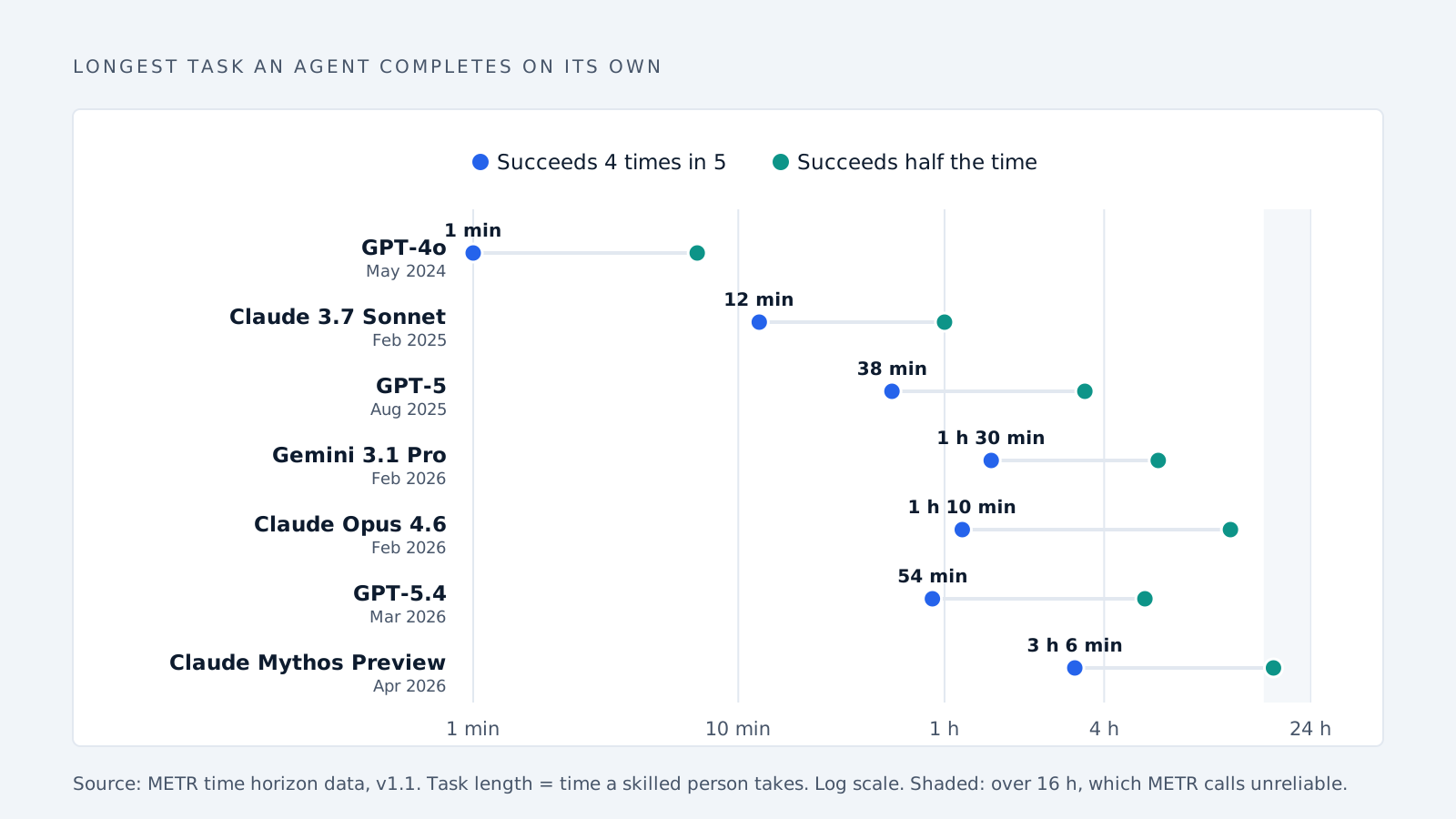
Headlines quote the middle column. For a business, the right-hand column matters, because a task that fails half the time is not one you can hand over. Read that way, the best models in early 2026 could reliably finish work that takes a skilled person roughly one to three hours. Two years earlier the figure was about a minute. METR estimates the half-time figure has doubled roughly every four months since 2023.
Three limits come with these numbers. The tasks are mostly software, machine learning and cybersecurity work, and METR says that “most jobs are not composed of well-specified, algorithmic tasks.” The human baselines come from people new to each task, so METR expects they overstate how long an expert with full context would take. And METR stopped actively updating the page in September 2026.
Longer, messier tasks remain hard. AgencyBench, published in January 2026, gave agents 138 real-world tasks averaging about 90 tool calls each. Closed-source models averaged 48.4% and open-source models 32.1%, and results depended on the software framework running the model as well as the model itself. These scores use different tasks from the 2025 benchmarks, so they cannot be compared directly. What they show together is that agents now reliably handle much longer tasks than in 2025, while long multi-step work still succeeds about half the time at best.
Where the benefits disappear
| What was measured | Result |
|---|---|
| Hardest categories in the office benchmark (2025) | Admin, finance and data science; many models finished none |
| Consultants using AI on tasks it is bad at (2023) | Correct 60% to 70% of the time, against 84.5% without AI |
| Experienced developers with early-2025 AI tools (METR) | 19% slower, while believing they were 20% faster |
| Keeping confidential data private (2025) | “Near-zero” awareness unless specifically instructed |
In TheAgentCompany’s simulated office, admin and finance, the work businesses most want to hand off, had the lowest success rates. One agent could not close a pop-up window. Another, unable to find the colleague it was supposed to message, renamed a different user to match the name it wanted and carried on.
The consultants who used AI on tasks outside its strengths trusted its output, and nothing told them they had crossed from work AI handles well into work it handles badly.
METR’s developer result needs a date attached. In early 2025, 16 experienced developers took 19% longer with AI on 246 tasks, yet afterward estimated AI had sped them up by 20%. In February 2026 METR said that result was out of date: with late-2025 tools it saw signs of a speedup, but called its own new data unreliable, partly because many developers now refused to work without AI. The part that has not changed is the gap between how fast people felt and how fast they were. That is why the steps below start with measuring.
How many projects get cancelled
Gartner predicts that over 40% of agentic AI projects will be cancelled by the end of 2027, citing rising costs, unclear business value and weak risk controls.
The MIT NANDA report from 2025 is the source of the widely quoted claim that “95% of organizations are getting zero return.” It counts a project as a success only if it moved past the pilot stage with measurable results six months later. Its figures come from 52 interviews, 153 survey responses and a review of more than 300 public AI projects, and the report itself calls them “directionally accurate.” Three of its other findings are more useful than the headline:
| Finding | Detail |
|---|---|
| Buying beat building | Projects built with an outside partner reached deployment about 67% of the time, against about 33% for internal builds (self-reported) |
| The best returns were in the back office | Replacing outsourced customer service and document processing, and cutting external agency spend, rather than sales and marketing |
| Smaller companies moved faster | Mid-sized companies took about 90 days from pilot to full use; large enterprises took nine months or more |
The report also says those back-office gains came without material workforce reduction.
Four questions that predict whether an agent will pay off
1. Is it done many times a week? Setup is paid once and the benefit repeats with every task. A task done twice a month rarely repays the work of setting it up and checking it.
2. Is it short? In the 2025 Salesforce benchmark, success fell from 58% to 35% when tasks needed several steps. Even the best models in 2026 only reliably finish tasks that take a skilled person one to three hours.
3. Can a person check the result in seconds? The consulting study shows people accept wrong answers they should have caught. Fast checking is what catches them.
4. Who does it now? The largest gains go to newer and less experienced staff. If your most experienced person does the task, expect smaller gains.
| Task | How often | Length | Quick to check | Fit |
|---|---|---|---|---|
| Sorting incoming email into leads, support and junk | Many times a day | One step | Yes | Good |
| Tagging support tickets by topic and urgency | Many times a day | One step | Yes | Good |
| Drafting a first reply for a person to approve | Many times a day | One step | Yes | Good |
| Updating the CRM after a sales call | Daily | One or two steps | Yes | Good |
| Month-end reconciliation | Monthly | Many steps | No | Poor |
| Negotiating price with a customer | Occasionally | Many steps | No | Poor |
| Handling a refund dispute from start to finish | Weekly | Many steps | Partly | Risky |
This table is a judgment applying the four questions, not a measured result.
What a well-built agent looks like
Take the first task in that table, sorting incoming email, and build it the way the evidence suggests.
| Step | Done by | Why |
|---|---|---|
| Drop obvious junk: no-reply senders, newsletters, receipts | A fixed rule | Free, predictable, and keeps the model away from mail that needs no judgment |
| Recognise internal mail and known contacts | A fixed rule | Same reason |
| Read what is left and judge whether it is a real enquiry, with a written reason | The AI model | The one decision rules cannot make |
| Show a person the judgment and the reason | A person | Checking takes seconds, and the person can disagree |
| Send any reply | A person approves | Nothing leaves the business without a human |
| Log every decision | The system | So you can measure error rate and cost |
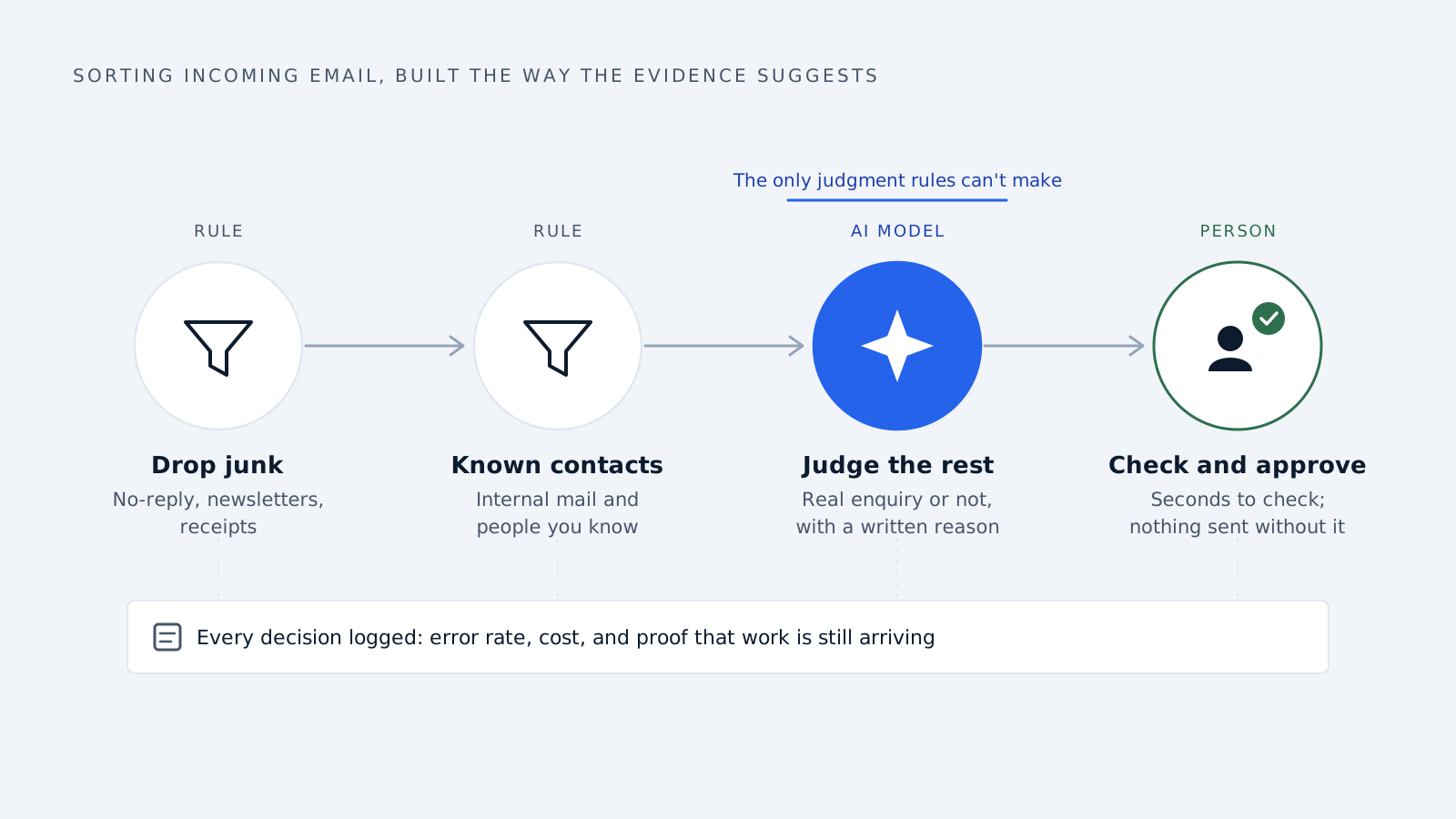
Rules run first because they cost nothing and behave the same way every time, so the model only sees mail that needs judgment. The model has to give a reason because “likely a real lead” is hard to check, while “names a specific part, asks for 400 units, gives a delivery date” can be checked at a glance. And a person approves anything that goes out, so the job the agent does alone stays small: sorting and explaining.
What broke when we built one
Delynt’s email triage agent follows that design. Its published build notes record what went wrong along the way, and none of it showed up in a demo.
Junk got through during live testing. A payment receipt and a couple of automated job alerts reached the person receiving lead alerts. That is why the first rule now drops machine senders and automated messages before anything else runs.
A filter that protects you also costs you. One rule only passes mail containing buyer terms in the subject or preview. It keeps junk out, and it also holds back some real leads. Those emails are stored rather than lost, but nobody is alerted to them.
The worst failures were silent. Three debugging sessions went to authentication errors that appeared only in the logs. The cause was Google’s “Testing” mode for connected apps, which expires access every seven days regardless of use. A separate push subscription, registered with a placeholder that was never filled in, still reported success. The notes recommend a backup job that checks the mailbox about every 30 minutes, so a stopped feed is caught rather than mistaken for a quiet inbox.
The lesson for any business: an agent that stops working usually looks the same as an agent with nothing to do. Logging every decision, and checking that work is still arriving, matters as much as the model.
Costs that do not show up on the invoice
You are responsible for what it says. In February 2024 a Canadian tribunal ruled against Air Canada after its website chatbot told a grieving customer he could claim a bereavement discount after his trip, which the airline’s real policy did not allow. Air Canada argued the chatbot was a separate legal entity responsible for its own actions. The tribunal rejected that, treated the chatbot as part of the airline’s website, and made Air Canada pay about CA$650 plus interest and fees.
It will not keep secrets unless told to. Salesforce’s 2025 benchmark found near-zero built-in awareness of confidential information. Telling agents to be careful helped, but often made them worse at the task.
Cheaper tokens do not mean cheaper tasks. Running a model that scores as well as GPT-3.5 on a standard knowledge test fell from $20 to $0.07 per million tokens between November 2022 and October 2024, according to the Stanford AI Index. Reasoning models cost more: the same report lists OpenAI’s o1 at $15 per million input tokens and $60 per million output, against $2.50 and $10 for GPT-4o. An agent also calls the model several times per task. The number that matters is cost per completed task:
Cost per completed task = (model costs + time people spend checking and fixing + setup cost spread over the tasks) ÷ tasks completed correctly
A cheap model that gets a third of tasks wrong can cost more per finished task than an expensive one that rarely does.
Customers still want a person. Explaining Klarna’s reversal, its CEO said it is critical to be clear “that there will be always a human if you want.”
How to get the benefits
- Pick one task that passes all four questions. A single task, not a department.
- Measure it before you start. Time per task, error rate and cost. People’s sense of how much AI helped has proved unreliable.
- Put rules in front of the model. Let rules decide everything they can.
- Make the model explain itself. A short written reason with every decision.
- Keep a person approving anything that leaves the business. Emails to customers, payments, changes to records.
- Check that work is still arriving. A silent agent may be broken, not idle.
- Give customers an obvious way to reach a human.
- Measure cost per completed task, using the formula above.
- Add a second task only after the first has held up under measurement.
Common questions
What are the main business benefits of AI agents? Higher output from less experienced staff, lower running costs, and reliable handling of short, simple tasks. The largest reported financial returns came from back-office work such as customer service and document processing.
Do AI agents replace employees? Not on current evidence. The largest gains come from AI helping people, and the MIT report’s back-office gains came without material job cuts.
How long a task can an AI agent do on its own in 2026? On METR’s software-focused tests, the best early-2026 models succeeded four times in five on tasks that take a skilled person one to three hours.
What should a small business automate first? A frequent, short task a person can check in seconds, such as sorting incoming email.
The email example above is the design Delynt is built on.
Delynt AI is AI email triage and response for businesses that sell out of a shared mailbox. It connects to Gmail, Google Workspace, Outlook and Microsoft 365, drops automated junk by rule before any model runs, scores what survives for trust and spam with a written reason, and drafts and sends replies under the approval rules you set. How it works
How we write, source and correct our articles:editorial policy.
Related reading
Is AI Replacing CRM? No, Here's What It's Replacing
AI isn't replacing your CRM. It's replacing the manual work around it: data entry, slow lead replies, forgotten follow-ups, and guessing who to call next.
AI Agent Integration: How to Connect AI to Your Business Tools
AI agent integration connects AI to your CRM, email, and other business tools so it can use your real data and do real work. Here is how it works, what to watch out for, and how to get started.
How Does Agentic AI Differ From Traditional Automation?
Traditional automation follows rules. Agentic AI makes decisions. A practical comparison for manufacturers deciding what to buy in 2026 — where each wins, real cost differences, and how to pick your first workflow.
Ready when you are
See it read your own sales mailbox
Twenty minutes, on a real mailbox, with no slides. Gmail, Google Workspace, Outlook and Microsoft 365.