Is AI Replacing CRM? No, Here's What It's Replacing
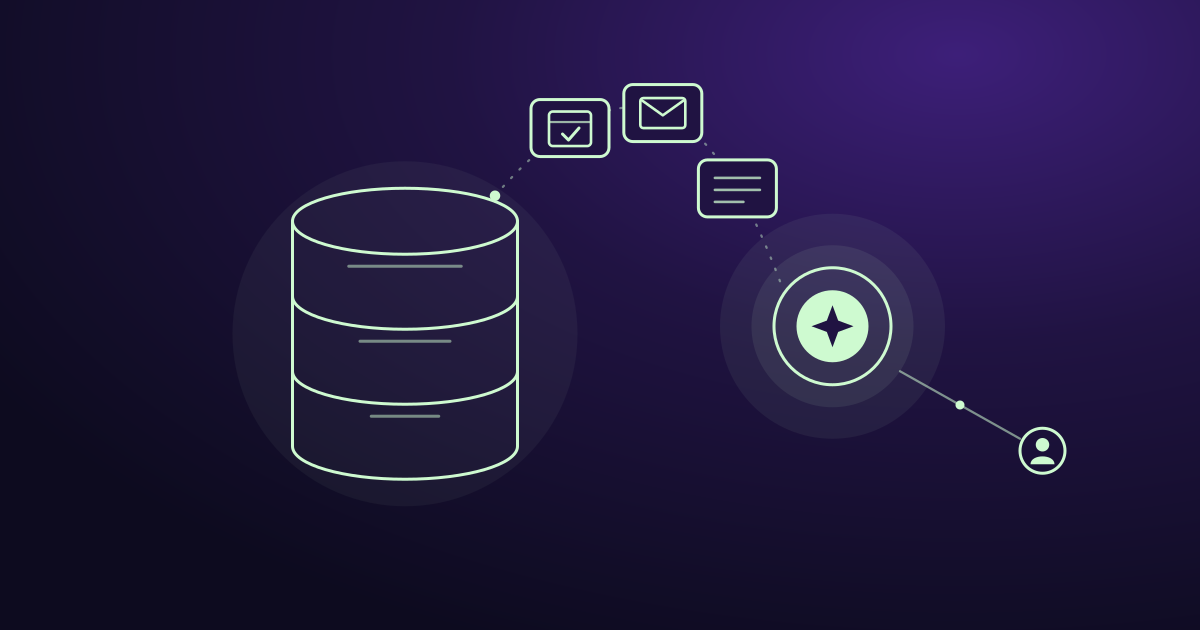
AI is not replacing your CRM. Your CRM still stores your customer data, and you still need it. What AI replaces is the manual work around it: typing in notes, answering new leads, following up, and deciding who to call next.
Think of it this way. The CRM holds the information. AI does the work.
That difference changes what you should buy, what you should fix, and where your sales team spends its time.
A lead that waited too long
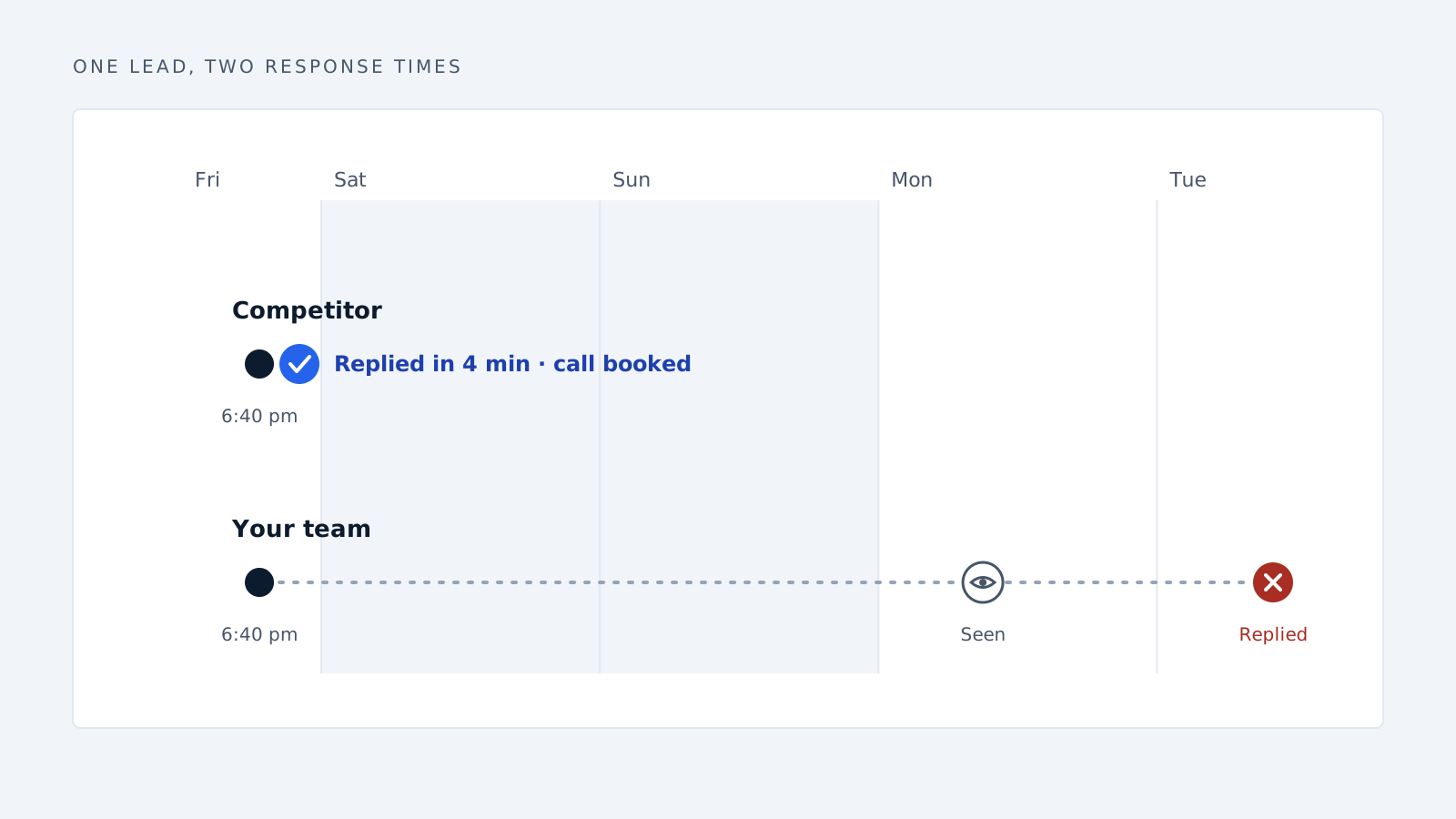
A new lead fills out your contact form at 6:40 on a Friday evening. They’re comparing three companies and they’re ready to talk.
Your team sees it Monday. Someone replies Tuesday. By then, the lead has booked a call with a competitor who answered in four minutes.
The lead was in your CRM the whole time. It just sat there.
Stories like this are why so many business owners now ask whether AI will make the CRM obsolete.
Why people think the CRM is dead
Ask a sales manager about their CRM and you’ll hear the same complaint: “It’s only as good as what people put into it.”
And people don’t put much in.
Salespeople are hired to sell, not to type notes. So calls don’t get logged. Deal stages go stale. Contact records stay half-empty. Managers stop trusting the pipeline report, and the CRM turns into an expensive address book.
Then AI tools showed up that could write emails, summarize calls, answer inquiries, and screen leads with no typing at all. To a lot of people, that looked like the end of the CRM.
But the diagnosis was wrong. The database was fine. The problem was that it relied on busy people doing boring work every single day. Most don’t.
AI solves the effort problem. The storage problem was never real.
What AI is actually replacing
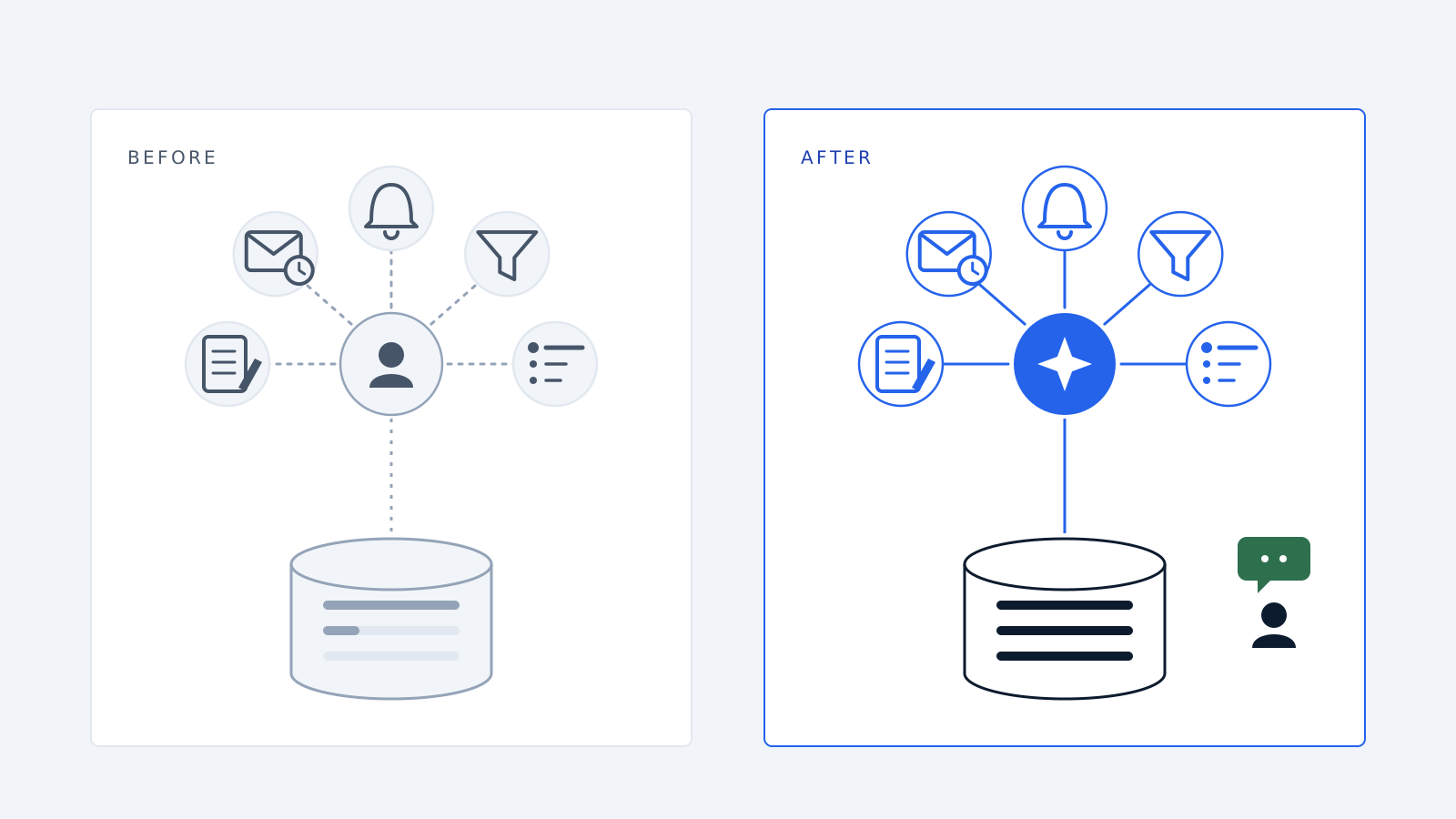
1. Manual data entry
Before: A rep finishes a 30-minute sales call, writes three bullet points, and promises to update the CRM later. Later never comes.
After: AI records the call, summarizes it, and saves the budget, timeline, and objections into the right CRM fields. The rep doesn’t type a word.
2. Slow replies to new leads
Before: Inquiries land in a shared inbox. Someone answers when they get a chance, which often means hours or days.
After: AI replies in seconds, even at night or on weekends. It asks a few screening questions and books a meeting on the right rep’s calendar.
3. Follow-up that depends on memory
Before: A good prospect says, “Check back in two weeks.” The reminder gets buried and the deal quietly dies.
After: AI keeps track of every open conversation. It sends the follow-up on time and alerts the rep when the prospect replies with real interest.
4. Sorting real buyers from browsers
Before: Your best salespeople spend hours on calls with people who were never going to buy.
After: AI checks the basics first: company size, need, budget, and timing. Only the leads that fit reach your team.
5. Deciding what to do next
Before: Each morning, reps scroll through their deals and guess which ones need attention.
After: AI shows which deals are heating up, which are going cold, and what each one needs today.
What AI can’t replace
This is where the “CRM is dead” argument falls apart.
You still need one place for your customer data. AI works from clean, organized information: contacts, companies, deal history, and who owns what. A CRM gives it that. Take the CRM away and the AI has nothing reliable to work with.
You still need people for the work that closes deals. Negotiating a big contract, reading a nervous buyer, handling a tough objection, and building trust over months are human jobs. That’s where your best salespeople should spend their time.
You still need a clear sales process. If your team can’t agree on what a good lead looks like, AI won’t fix it. It’ll just repeat the confusion faster.
So AI doesn’t make the CRM less important. It finally makes the CRM worth what you pay for it.
The setup that works: your CRM plus AI
The companies seeing real results aren’t throwing out their CRM. They’re adding AI on top of it.
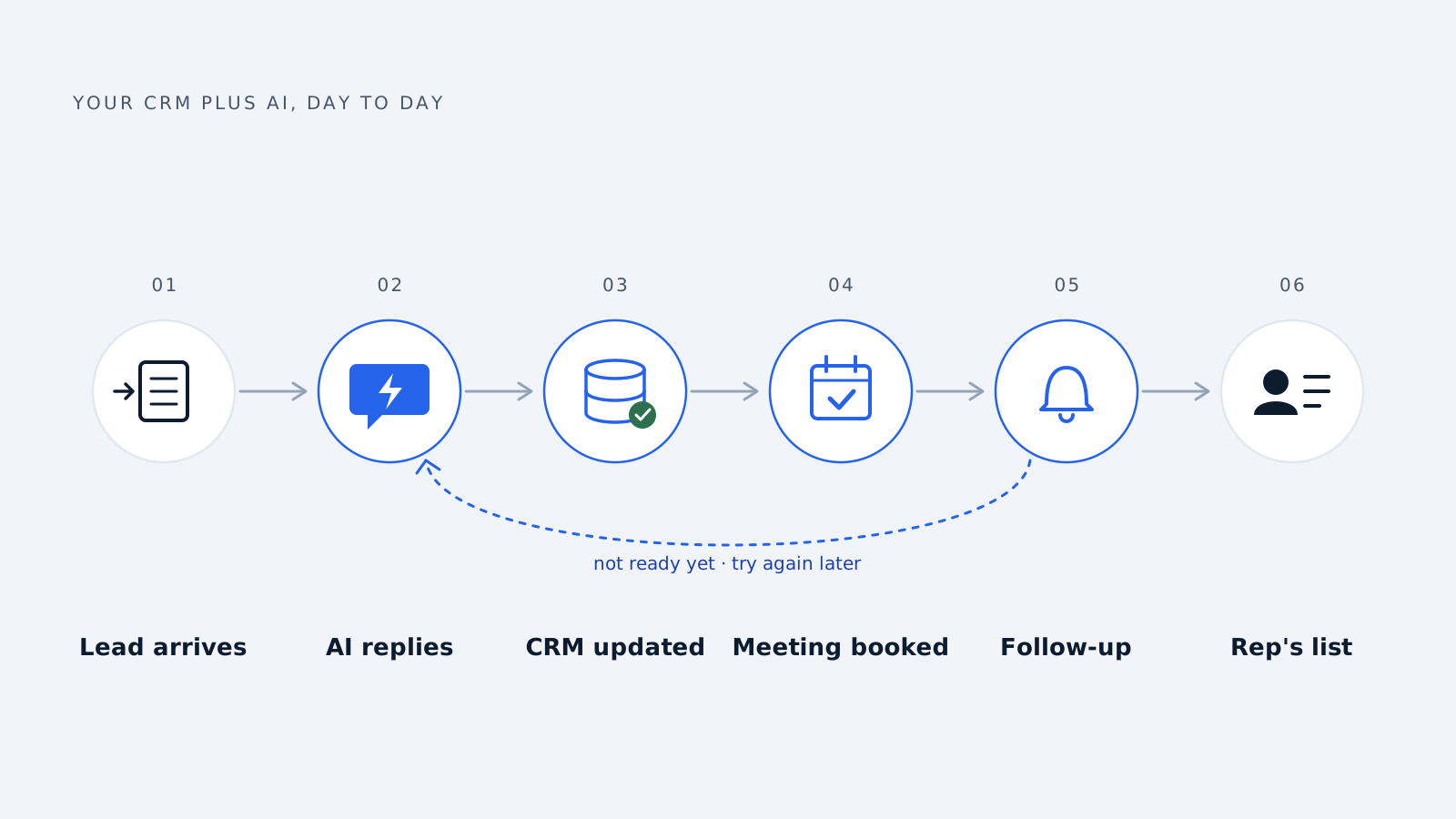
Here’s how that looks day to day:
- A lead comes in from your website, an ad, email, or chat.
- AI replies right away, answers basic questions, and checks if the lead is a fit.
- AI updates the CRM with the contact’s details, notes, and lead score.
- Good leads get booked straight onto a rep’s calendar.
- AI follows up with leads who aren’t ready yet, so none slip away.
- Reps get a short daily list of the conversations that need a person.
Your CRM stays accurate without anyone chasing the team. Your reps get hours back each week. And your managers can finally plan around the pipeline.
Check your own sales process
Before you buy another tool, answer these four questions honestly:
- How fast do we reply to a new inquiry, including evenings and weekends?
- How much of our CRM data is typed in by hand, and how much is out of date?
- How many leads went cold last quarter because nobody followed up?
- How many hours do our salespeople spend on admin instead of talking to buyers?
If those answers hurt a little, you probably don’t need a new CRM. You need to automate the work around the one you have.
How Delynt fits in
Delynt builds AI solutions for sales and marketing teams. We connect to the tools you already use, like your CRM, inbox, forms, and calendar. Then we take over the repetitive work: capturing leads, screening them, following up, and keeping your data clean. Your team keeps full control of every relationship. We make sure no opportunity gets lost along the way.
Frequently asked questions
Do I still need a CRM if I use AI? Yes. AI needs one reliable place to store and read customer data, and that’s what a CRM is for. Without it, there’s no single source of truth for contacts, deal history, or ownership. The best setup uses the CRM as the database and AI as the layer that keeps it updated and acts on it.
Can AI update my CRM automatically? Yes. AI can log calls and emails, summarize meetings, fill in contact details, move deals between stages, and add notes with no manual input. This fixes the most common CRM problem: missing and outdated data, which happens because salespeople rarely have time to type it in themselves.
Will AI replace salespeople? No. AI takes over repetitive tasks like data entry, first replies, lead screening, and routine follow-up. Building trust, handling hard objections, and negotiating deals still need people. In practice, AI frees up salespeople to spend more time on the conversations that actually close business.
What’s the difference between an AI CRM and adding AI to my CRM? An AI CRM is a CRM with AI features built in. Adding AI to your CRM means connecting AI tools to the system you already use. The second option avoids a costly switch, keeps your data and habits in place, and lets you automate beyond the CRM, including email, forms, and chat.
How quickly can a business start using AI for sales? Most businesses can launch one workflow, such as instant lead replies or automatic follow-up, within a few weeks. Starting small lets you measure the effect on reply times and sales before you expand. The key is connecting AI to the tools you already use instead of rebuilding everything.
Stop losing leads to slow follow-up
Your CRM isn’t going anywhere. The hours your team spends feeding it, and the leads that slip away meanwhile, can.
Book a demo with Delynt and we’ll map your sales process and show you exactly where AI can take over the work.
How we write, source and correct our articles:editorial policy.
Related reading

AI Agent Integration: How to Connect AI to Your Business Tools
AI agent integration connects AI to your CRM, email, and other business tools so it can use your real data and do real work. Here is how it works, what to watch out for, and how to get started.

How to Train an AI Model for Your Mid-Sized Company's Sales Team
Training AI for sales means teaching a capable model your buyers, playbook and data, not building one from scratch. Six practical steps for mid-sized teams.

Where to Find AI Conversation Analytics With CRM Integration
AI conversation analytics records your sales calls and puts the key details into your CRM. Here is where to find it, what it costs, and how to pick the right tool.
Ready when you are
See it read your own sales mailbox
Twenty minutes, on a real mailbox, with no slides. Gmail, Google Workspace, Outlook and Microsoft 365.