Agentic email triage: how AI reads and scores your quote requests before you open your inbox
An agentic email system filters inbound mail through cheap deterministic rules first, sends only genuine first-contact quote requests to a language model for trust and spam scoring, and delivers the result to a channel the operator already checks. This article covers the architecture, the trade-offs, and what we learned building it.
What shipped, and what didn’t. Everything through routing is running in production: the Gmail connection, the rule-based pre-screen, the trust and spam scoring with written reasoning, and the Telegram delivery with per-inbox and company-wide routing. The two sections after that — the human-gated reply flow and the question-answering layer over accumulated mail — are designs, not shipped features. They are in this article because the reasoning behind them is the useful part, and each is labelled where it appears. Delynt AI does not send mail, does not read attachments, and has no dashboard.
The problem nobody in manufacturing talks about
Every manufacturing business I’ve looked at has the same quiet leak, and it isn’t in the CRM or the ad spend. It’s the inbox.
A machine shop owner opens Outlook on Monday morning to 140 unread messages. Somewhere in there are four genuine RFQs. The rest is supplier newsletters, LinkedIn digests, Glassdoor job alerts, payment confirmations, and three variations of “quick question about your website ranking.” Finding the four takes twenty minutes of opening and closing. Sometimes it takes until Wednesday.
The lead that waited until Wednesday usually went somewhere else on Tuesday.
This isn’t a discipline problem. It’s a structural one. An inbox is a chronological list that treats a $60,000 quote request and a coupon email as equally important objects. No amount of folders fixes that, because folders still require a human to have already read the thing.
What actually fixes it is a system that reads first and interrupts second.
What “agentic” actually means here (and what it doesn’t)
The word gets thrown around loosely, so let me be precise about what I mean, because the distinction changes the architecture.
A filter sorts mail into buckets based on rules you wrote. Useful, dumb, cheap.
An assistant summarizes things after you ask it to. Useful, but you still have to ask.
An agent observes a stream of events, makes judgments about them without being prompted, and takes or proposes actions based on those judgments.
The third one is what we built. Nobody clicks “analyze my inbox.” An email lands in Gmail, and within a couple of seconds the system has already decided whether it’s noise, whether it’s a real quote request, how much to trust it, and whether the operator needs to know about it. If it’s worth knowing about, the operator gets a message on their phone with a score and a written reason — without ever opening an email client.
The thing that makes it agentic isn’t the language model. It’s that no human initiates the loop.
The architecture: four decisions, in cost order
The single most important design principle in this whole system is this: do the cheap checks first, and only spend money on the expensive one when the cheap checks say it’s worth it.
That sounds obvious. Almost nobody does it. The default instinct when building AI features is to throw everything at the model and let it sort things out. That works beautifully in a demo with twelve emails and falls apart economically the moment a real business with 3,000 messages a month plugs in.
Here’s the order we settled on.
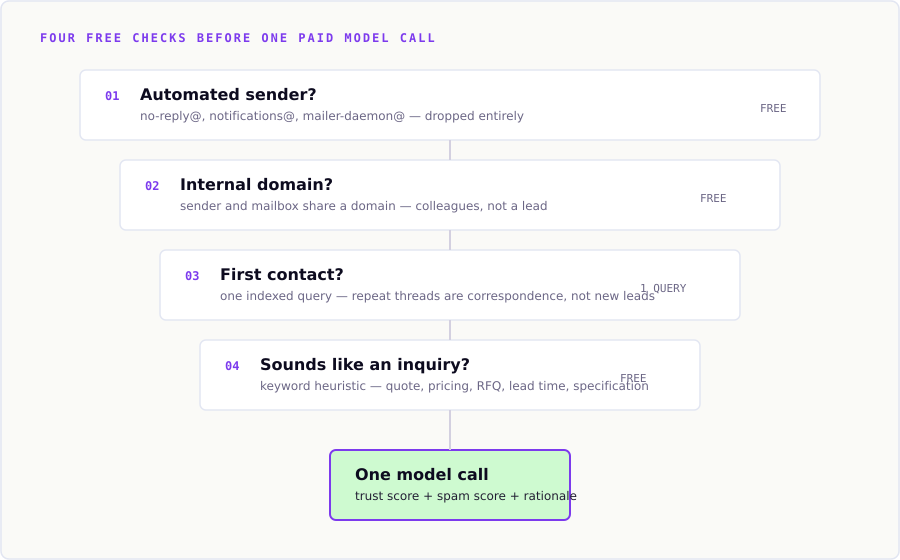
Layer 1: Is this from a machine?
Free. Pure string matching, no API calls, no database queries.
Certain sender patterns are never, under any circumstance, a sales lead: no-reply@, noreply@, notifications@, mailer-daemon@, postmaster@, unsubscribe@. Certain body phrases are equally definitive: “your ticket has been updated,” “delivery status notification,” “you are receiving this newsletter because.”
These get dropped entirely — not scored, not stored as noteworthy, not sent anywhere. When we first ran the system against a live test inbox, the first few notifications that slipped through were a payment confirmation receipt and a couple of automated job-alert emails. That’s when this layer got built. If an operator’s phone buzzes for a payment receipt, they mute the bot within a day, and the entire product is dead.
Layer 2: Is this internal?
Also free. Compare the sender’s domain against the connected mailbox’s own domain. If someone at @yourcompany.com emails someone else at @yourcompany.com, that’s colleagues talking. It isn’t a lead, and it shouldn’t be scored as one.
One honest caveat worth documenting, because it bit us: this check is meaningless for free consumer domains. If the connected mailbox is a @gmail.com address, every Gmail sender on earth appears “internal.” For businesses on their own domain — which is every real customer — it works correctly. For testing against a personal Gmail, it produces confusing results. Know which one you’re looking at.
Layer 3: Have we heard from this person before?
One indexed database query. Still no API cost.
A genuine new lead is, almost by definition, the first email you’ve ever received from that address. An ongoing thread with an existing customer is valuable, but it’s a different thing — it doesn’t need lead-scoring, it needs to be surfaced as ordinary correspondence.
This one check cuts model spend dramatically in real-world use, because the majority of inbound volume in an established business is continuing conversation, not new contact.
Layer 4: Does this even sound like an inquiry?
Free keyword heuristic against subject and preview text. Words like quote, pricing, RFQ, interested in, availability, lead time, specification, sample are what actual buyers write. Absent any of them, we hold back.
This layer is deliberately imperfect and I want to be honest about that. It will miss a lead that opens with “Hi, saw your booth at IMTS, are you guys taking on new work?” — no keywords, real lead. That’s a false negative, and false negatives in lead detection are the expensive kind of error.
Two mitigations: the keyword list is a living configuration that widens as you see real misses, and the email is still stored and still visible — it just doesn’t get scored or trigger an alert. Nothing is lost, only de-prioritized. As real volume accumulates, this is the layer most worth replacing with a cheap classifier trained on actual outcomes.
Only now: the model
An email that survives all four gates gets one language model call. One. Not a chain, not an agent loop with six tool invocations — a single structured request that returns three things.
Why trust and spam are two separate scores
This was the design decision I’d defend hardest, and it’s the one most people get wrong.
The obvious approach is a single “quality” score from 1 to 10. It’s also wrong, because legitimacy and unsolicitedness are genuinely independent properties:
| Email type | Trust | Spam | What you should do |
|---|---|---|---|
| Existing customer negotiating terms | High | Low | Reply today |
| Cold RFQ from an unknown company | Medium | Low | Reply today, verify before quoting |
| Legitimate trade publication newsletter | High | High | Ignore, but it’s not dangerous |
| Phishing attempt impersonating a supplier | Low | High | Ignore and flag |
| Invoice fraud from a lookalike domain | Very low | Low | Escalate immediately |
That last row is why one score fails. Invoice fraud is targeted, personal, and specifically written to not look like spam — a single blended score would rate it as a legitimate business email. Separating the axes catches it: low trust with low spam is a distinct and dangerous signature that a combined metric mathematically cannot express.
Alongside both scores, the model returns a one- or two-sentence rationale. Here’s a real one from our test inbox:
Trust: 7/10 · Spam: 2/10 “Sender uses a personal email address and a generic greeting, but the request is specific and plausible for a business inquiry. No red flags for phishing, though the lack of company context lowers trust slightly.”
That’s the difference between a number and a judgment. An operator reading “7/10” learns almost nothing. An operator reading that knows exactly which detail to check before quoting.
The delivery problem: a dashboard nobody opens is worse than no dashboard
We built the scoring, and then had to answer an uncomfortable question: where does the result go?
The instinctive answer is a web dashboard. We deliberately didn’t build one, and I’d argue that was the highest-leverage decision in the project.
A dashboard requires the operator to remember to visit it. The person we’re building for is a plant manager who checks their phone forty times a day and opens a browser tab for their own business software maybe twice. Building a beautiful dashboard would have meant three weeks of frontend work to produce something that competes for attention against everything else in a browser — and loses.
Instead the output goes to Telegram. A chat message on the device they already have in their hand, in an app they already have open, in a format that requires zero training to understand.
The economics matter too: Telegram’s Bot API is free and requires no business verification. WhatsApp’s Business API charges per message and requires a Meta business review that takes days to weeks — and the conversational replies you’d actually care about are free inside a 24-hour window anyway, meaning the cost difference in practice is modest but the setup friction difference is enormous. For proving whether the core loop works, free and instant beats familiar and gated.
Multi-recipient routing is not optional
One nuance that only becomes obvious once you talk to an actual business with more than one employee: a company is not a single recipient.
A sales department might have three reps, each with their own inbox, each caring only about their own leads. The owner wants visibility across all of them. If everyone gets every notification, the reps mute the bot in a week.
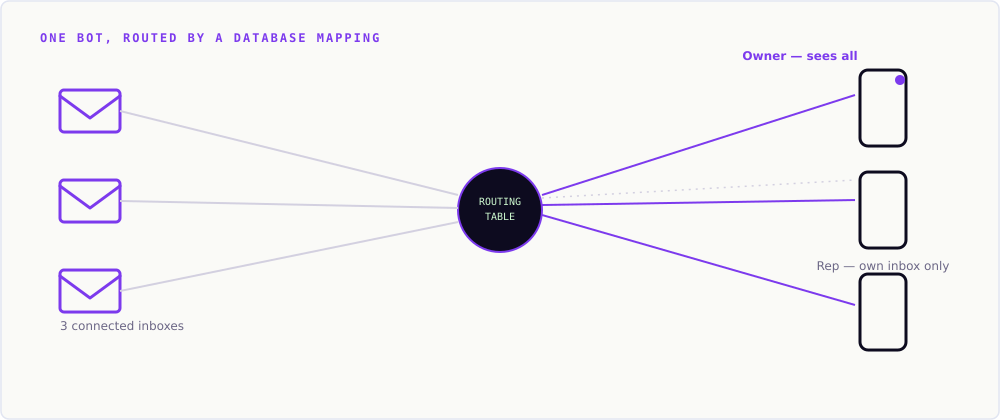
The routing model that solves this cleanly:
- A recipient linked with no specific mailbox receives notifications from every connected inbox — this is the owner’s view.
- A recipient linked to a specific mailbox receives only that inbox’s leads — this is the rep’s view.
Both share the same bot. Isolation happens in the database mapping, not by provisioning separate bots per customer. One bot serves every business on the platform; a routing table decides who hears about what.
Replying: why, if it ever drafts, the human still sends
Designed, not shipped. Nothing in this section is running. Delynt AI does not draft replies and does not send mail on anyone’s behalf — reading and judging is the whole of the product today. What follows is the design position we arrived at, and the reasoning is worth writing down precisely because it argues against building the obvious next feature.
Reading is half a product. Acting is the other half — and it’s where the trust question gets serious.
There’s a version of this that sends replies autonomously. It’s technically straightforward and I think it’s the wrong product for the current moment, for a reason that has nothing to do with model capability.
The cost of errors is asymmetric. A bot that fails to reply costs you a delayed response. A bot that sends a wrong reply — quoting a price you can’t honor, promising a lead time you can’t meet, misreading a complaint as an inquiry — costs you a customer relationship and possibly a legal problem. Those are not comparable, and no accuracy percentage makes them comparable.
So the flow, if it is ever built, is deliberately human-gated:
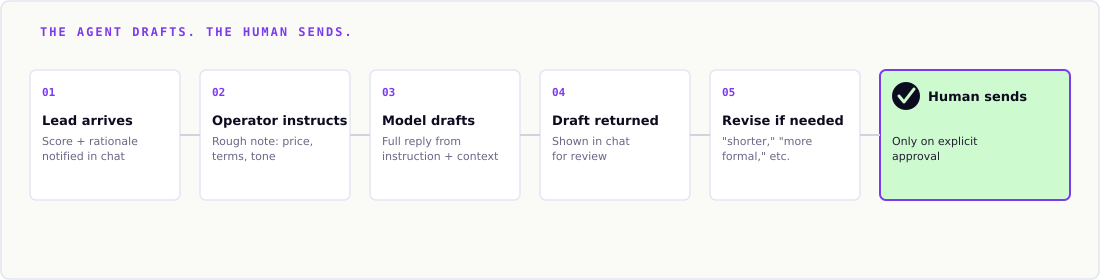
- A notification arrives with the lead and its score.
- The operator replies in chat with a rough instruction — “tell them yes, 500 units, three week lead time, ask about tolerance requirements.”
- The model drafts a complete, professional email from that instruction plus the original message’s full context.
- The draft comes back in chat for review.
- The operator approves, or revises — “shorter,” “more formal,” “don’t commit to three weeks.”
- Only on explicit approval does it send.
The instruction step is the whole point. The operator supplies judgment — the price, the commitment, the strategy — in five seconds of typing. The model supplies the twenty minutes of professional prose composition. Neither is doing the other’s job.
Threading is not a detail
One implementation point that’s easy to underestimate: a reply must land in the recipient’s existing conversation thread, not arrive as an orphaned new message.
That means preserving the original message’s Message-ID and setting In-Reply-To and References headers correctly on the outbound message. Get this wrong and your professionally drafted reply shows up in the prospect’s inbox as a disconnected message with no context — which reads as more careless than not replying at all.
Different providers handle this differently. Gmail’s API expects you to construct the headers yourself; Microsoft Graph handles conversation threading natively through its reply endpoints. Any system claiming multi-provider support has to abstract this properly rather than special-casing one provider and hoping.
From triage to intelligence: asking your inbox questions
Designed, not shipped. There is no question-answering layer, no CRM connection and no dashboard in Delynt AI today. This section is an architecture argument about how such a layer should be built if it is built — the precompute-then-generate pattern below is the transferable part, and it applies well beyond email.
Once months of scored, tagged inbound mail accumulate, a different class of value appears. Not “handle this email” but “tell me something true about all of them.”
Which product line gets asked about most? Is inquiry volume up or down this quarter? What are prospects actually saying about our lead times?
There’s a naive way to build this and a correct way, and the difference becomes financially significant fast.
The naive approach: hand the model every email and ask your question. This works with fifty emails. With five thousand it exceeds context limits, costs real money on every single question, and — counterintuitively — gets less accurate, because models demonstrably lose track of details buried in very long contexts even when they technically fit.
The approach that scales: tag each email once, at the moment it arrives, with what it’s about. Then let the database do the counting and the model do only the talking.
“Which product is asked about most” becomes a GROUP BY query — instant, free, exactly as accurate as your data. The model receives a five-row summary, not five thousand emails, and its only job is turning that into a sentence a human wants to read. Cost per question drops by roughly three orders of magnitude, and accuracy goes up, because arithmetic is being done by a database instead of estimated by a language model.
This is the single most important pattern in applied AI for business data, and it’s consistently the one that gets skipped: precompute the structure, generate only the language.
Where CRM data becomes the multiplier
Email tells you what people are saying right now, in their own words. A CRM tells you what already happened — deal size, stage, close date, history.
Questions like “how much pipeline value is tied to inquiries about Product X this quarter” can’t be answered from email alone, because email doesn’t contain deal values in structured form. They also can’t be answered from CRM alone, because a CRM doesn’t know about the inquiry that arrived this morning and hasn’t been entered yet.
The insight layer would get genuinely powerful when both feed it. That’s the argument for CRM integration — not “another data source” but “the thing that makes financial questions answerable at all.” It is also why Delynt AI has not built one: a CRM connection only earns its cost once there is an insight layer for it to feed, and there isn’t one.
What we’d tell anyone building this
Five things, learned the hard way:
1. Verify your OAuth publishing status before you build anything on it. Google OAuth apps in “Testing” mode have refresh tokens that expire every seven days regardless of activity. This is separate from — and more disruptive than — the seven-day expiry on Gmail’s push notification subscriptions. We lost three separate debugging sessions to silent 401 UNAUTHENTICATED failures before tracing it to a publishing-status setting nobody had looked at. Any production system using sensitive Gmail scopes needs to complete Google’s verification review, and that review takes days to weeks. Start it early; it blocks nothing else while pending.
2. Silent failures are the dangerous ones. Every failure mode we hit failed quietly. The push webhook fired correctly; the sync inside it died. A watch subscription registered against a topic name containing an unreplaced placeholder and returned success. A push subscription silently had authentication disabled and every notification was rejected with a 401 our own logs classified as routine. None of these threw a visible error. If you build event-driven infrastructure, build a slow polling job alongside it as a safety net — not because polling is good, but because it’s the only thing that tells you push has stopped working.
3. Match your data model to your actual goal, not your first sketch. We initially stored only email metadata and snippets, because the original spec said “metadata.” Then the goal clarified: the bot needs to read and reply, which requires full message bodies. That’s a one-line change to a fetch parameter plus MIME body parsing — cheap to fix, but only because it was caught early. The lesson isn’t “we made a mistake”; it’s that a spec can quietly contradict its own stated goal, and checking that alignment before writing code costs nothing.
4. Cheap filters aren’t a compromise — they’re the architecture. Roughly 90% of inbound volume in a real inbox can be correctly classified by string matching and one indexed query. Spending model calls on that 90% isn’t more sophisticated; it’s just more expensive for identical results.
5. Ship the notification channel before the dashboard. The fastest path to a working product was a chat bot, not a UI. A dashboard would have real value later — for browsing history, for charts, for looking like a product in a sales demo — but it is not what makes the system useful on day one, and it is still unbuilt for exactly that reason.
Frequently asked questions
What is agentic email triage?
Agentic email triage is a system that automatically evaluates every inbound email without being prompted — filtering automated noise, identifying genuine new inquiries, scoring them for trustworthiness and spam likelihood, and notifying the right person with reasoning attached. Unlike a filter, which only sorts, or an assistant, which waits to be asked, an agent observes the stream continuously and acts on its own judgment.
How is trust score different from spam score?
Trust measures whether a sender and message appear legitimate and safe. Spam measures whether the message is unsolicited or bulk. They’re independent: a legitimate trade newsletter is high trust and high spam, while a targeted invoice fraud attempt is low trust and low spam. A single blended score cannot express that difference, which is precisely why fraud attempts slip through single-score systems.
Does every email get sent to an AI model?
No, and it shouldn’t. Four free filtering layers run first — automated-sender detection, internal domain matching, repeat-contact lookup, and inquiry keyword matching. Only emails clearing all four receive a model call. This typically eliminates the large majority of inbound volume at effectively zero cost.
Can the AI send replies automatically without approval?
It can technically, but a well-built system deliberately requires human approval. The cost of errors is asymmetric: a missed reply costs a delay, while a wrong reply — an unauthorized price, an unmeetable lead time — costs a customer relationship. The operator supplies the instruction and the judgment; the model supplies the professional prose; the send only happens on explicit confirmation.
Why use Telegram instead of a web dashboard?
Because operators check their phones constantly and their business dashboards rarely. A chat message arrives where attention already is, requires no training, and took days rather than weeks to build. A dashboard remains valuable later for browsing history and visualizing trends, but it isn’t what makes the system useful on day one.
How do you handle multiple sales reps in one company?
Through a routing layer that maps recipients to mailboxes. A recipient linked to a specific mailbox receives only that inbox’s leads; a recipient linked to no specific mailbox receives everything, which is the owner’s view. All recipients share a single bot — isolation happens in the database mapping rather than by provisioning separate bots per customer.
Does this require training a custom AI model?
No. Fine-tuning bakes in a snapshot of data and requires retraining as new mail arrives — the wrong tool for data that changes daily. A general-purpose model given the right context at question time is both cheaper and always current. Self-hosted GPU infrastructure only becomes economical at volumes most businesses never reach.
What happens when Gmail push notifications fail silently?
This is the failure mode to design against explicitly. Push subscriptions expire, OAuth tokens lapse, and misconfigurations can cause every notification to be rejected without any visible error. The defense is a slow polling job — every 30 minutes or so — that syncs independently of push. It’s not a performance feature; it’s the only reliable way to detect that push has stopped working.
The point of all of it
None of this is about impressive demos. Every architectural decision above traces back to one deeply unglamorous outcome:
A business owner picks up their phone, and the four messages that mattered out of today’s hundred and forty are already waiting — scored, explained, and in front of the person who can actually answer them.
That’s the entire product. What they write back is their business. Everything else is plumbing.
Delynt AI is AI email triage and response for businesses that sell out of a shared mailbox. It connects to Gmail, Google Workspace, Outlook and Microsoft 365, drops automated junk by rule before any model runs, scores what survives for trust and spam with a written reason, and drafts and sends replies under the approval rules you set. How it works.
How we write, source and correct our articles:editorial policy.
Related reading

How AI agents are changing lead qualification for manufacturers
Manufacturing has one of the slowest B2B lead response times of any industry. Here's what the research says about why that costs deals, and how AI-driven qualification is closing the gap.
Is AI Replacing CRM? No, Here's What It's Replacing
AI isn't replacing your CRM. It's replacing the manual work around it: data entry, slow lead replies, forgotten follow-ups, and guessing who to call next.

AI Agent Integration: How to Connect AI to Your Business Tools
AI agent integration connects AI to your CRM, email, and other business tools so it can use your real data and do real work. Here is how it works, what to watch out for, and how to get started.
Ready when you are
See it read your own sales mailbox
Twenty minutes, on a real mailbox, with no slides. Gmail, Google Workspace, Outlook and Microsoft 365.