Is it safe to connect your inbox to an AI agent? Here's what the data actually says
If you’re a manufacturing owner weighing whether to connect your inbox to an AI agent, the hesitation makes sense before it even gets explained. Manufacturing has been the most-attacked industry in cybersecurity for four years running, and email is still the single most common way attackers get in. Asking a third-party system to read that inbox isn’t a small ask. It deserves real scrutiny, not a reassurance page.
So let’s actually look at the numbers, then walk through what separates a well-built integration from a risky one.
Manufacturing is already the target, with or without AI
This is worth sitting with for a second: manufacturers represented 26% of all security incidents across the top ten most-attacked industries in IBM’s 2025 X-Force report — the fourth year running that manufacturing has held that position. A separate 2026 industry survey found 60% of manufacturers experienced a significant email-based breach in the past year. Nearly one in five didn’t even detect the intrusion until after their data was already gone.
None of this is caused by AI agents. It’s the baseline reality of running a manufacturing business right now — low tolerance for downtime, comparatively lower cybersecurity maturity than sectors like finance or healthcare, and attackers who know a stopped production line creates maximum pressure to pay a ransom fast. Across all industries, over 75% of targeted cyberattacks start with an email, and 94% of organizations report having had at least one email security incident.
The point isn’t to alarm you further — it’s to reframe the actual comparison. The question isn’t “is connecting my inbox to an AI risky in the abstract.” It’s “how does this compare to what my inbox is already exposed to today, sitting in a shared account with no monitoring, no scoring, and whatever access controls came default with the mailbox.”
What “connecting your inbox” should actually mean
Not all integrations are built the same, and the difference matters more than most vendor security pages let on. Here’s what to actually check before connecting anything to a business inbox.
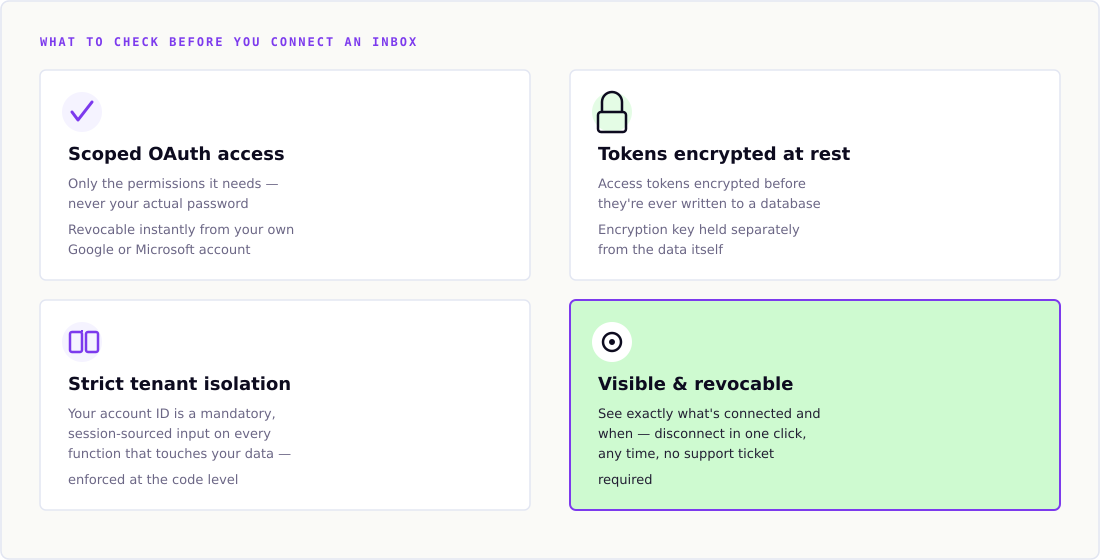
Scoped access, not full account access. A properly built integration requests only the specific permissions it needs — reading messages and sending replies, for example — through OAuth, not your actual email password. You can revoke that access at any time from your own Google or Microsoft account settings, instantly, without needing to change a password or notify the vendor. If a tool asks for your email password directly instead of an OAuth consent screen, that’s a real warning sign, not a convenience.
Tokens encrypted at rest, not stored as plain text. The access granted to your inbox is represented by a token — a credential that stands in for your permission. That token should be encrypted before it’s ever written to a database, using a standard like AES-256, with the encryption key held separately from the data itself. If a database were ever compromised, an encrypted token is useless without the key; a plaintext token is an open door.
Strict tenant isolation. If a vendor serves multiple customers from shared infrastructure — which nearly every SaaS tool does — the architecture needs to guarantee that customer A’s data is never reachable from customer B’s session, at the code level, not just as a policy promise. The correct pattern: every function that touches your data requires your account identifier as an explicit, mandatory input, sourced only from your authenticated session — never from a request parameter a client could tamper with.
A visible, revocable connection — not a black box. You should be able to see exactly what’s connected, when it was connected, and disconnect it in one click, at any time. An integration that’s invisible once granted, with no dashboard showing its status, is harder to trust and harder to audit.
Why this actually compares favorably to the status quo
Here’s the part that often gets missed in the “should we trust AI with our email” conversation: the realistic alternative isn’t a perfectly secure, untouched inbox. It’s a shared team inbox, often without multi-factor authentication properly enforced, checked manually by whoever has a spare ten minutes, with no systematic scoring of which incoming messages carry real risk.
Given that over half of manufacturers experienced an email-based breach in the past year, and phishing accounts for 42% of breaches industry-wide, a shared inbox with manual triage isn’t the safe default it might feel like. It’s the exact profile attackers already exploit successfully at scale. An AI agent that scores every inbound message for trust and intent signals — flagging suspicious sender patterns, spoofed domains, and social-engineering attempts before a human ever opens them — can function as an additional layer of defense, not just a productivity tool.
That said, this cuts both ways, and it’s worth being direct about it: an AI integration is only a net security improvement if it’s actually built with the safeguards above. A poorly built integration is a new attack surface layered on top of an already-vulnerable inbox, not a fix for it. The architecture is what determines which side of that line a given tool falls on — not the fact that it uses AI.
Questions worth asking any vendor before you connect anything
A short, practical checklist, based on the architecture points above:
- Does it use OAuth, or does it ask for your actual email password?
- Are access tokens encrypted at rest, and is the encryption key stored separately from the data?
- Can you see a live status of every connected integration, and disconnect it yourself, without contacting support?
- If the vendor serves multiple customers, how is your data isolated from theirs — ask for specifics, not a general assurance?
- What scopes does the integration actually request — read-only, or send access too — and does that match what you’d expect for what it does?
A vendor that can answer these plainly, without deflecting to a generic “we take security seriously” line, is telling you something real about how the system was built.
The actual trade-off
Manufacturing was already the most-targeted industry before AI agents entered the picture, and email was already the primary way in. That reality doesn’t change based on whether you connect an AI tool to your inbox — your exposure exists regardless. What changes is whether that inbox has any systematic defense watching it, and whether the credentials protecting it are built to the standard described above.
The right question isn’t whether connecting an inbox to anything carries risk. Everything does. It’s whether the specific integration you’re evaluating is built the way the checklist above describes — and whether that’s a meaningful improvement over a shared inbox with no scoring, no monitoring, and whoever’s free triaging it by hand.
Delynt AI reads a sales mailbox over a read-only Gmail grant you can revoke yourself, never trains on your mail, and cannot open attachments or reach any other Google service. What Delynt AI can and cannot see.
How we write, source and correct our articles:editorial policy.
Related reading

Agentic AI for small manufacturers: what it actually does
Agentic AI for small manufacturers: software that reads your CRM and inbox, then forecasts, replies, and scores leads. What it covers, and what it doesn't.
Agentic email triage: how AI reads and scores your quote requests before you open your inbox
How an agentic system filters and scores inbound mail — the architecture, the trust-vs-spam scoring model, what shipped, what stayed on the design table, and what broke.

AI agents in the manufacturing industry: sales and marketing use cases beyond the hype
What AI agents actually do for manufacturing sales today vs. what's still overhyped — RFQ triage and lead scoring are real; autonomous negotiation isn't.
Ready when you are
See it read your own sales mailbox
Twenty minutes, on a real mailbox, with no slides. Gmail, Google Workspace, Outlook and Microsoft 365.