How to Use AI for Real Estate Agents

The average agent closes nine deals a year. That is less than one a month. Median income is $59,200. In your first two years it is $8,000.
Those numbers come from NAR’s 2026 Member Profile. They matter because most AI tools sold to agents are built for a business that does not look like that. They are built for volume: hundreds of leads, long automated sequences, a team. The median real estate team closes 32 deals a year. You are not running that business, and tools designed for it will waste your money.
Here is what the job actually looks like, and where AI helps.
The numbers
| Median agent | First 2 years | 16+ years | Teams | |
|---|---|---|---|---|
| Deals closed per year | 9 | 2 | — | 32 |
| Sales volume | $2.7M | $330,000 | — | $17.5M |
| Gross income | $59,200 | $8,000 | $88,500 | — |
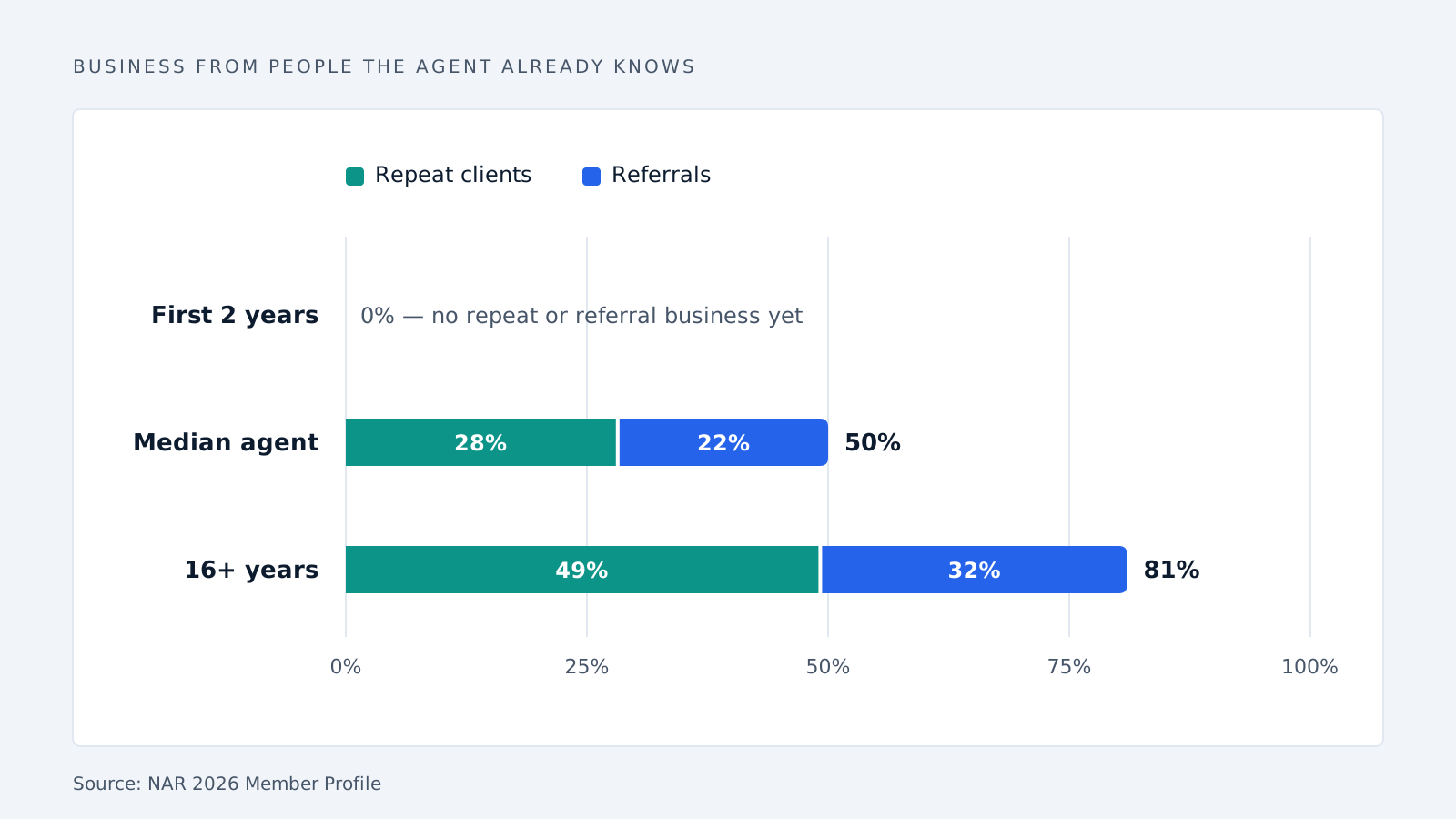
| Business from repeat clients | 28% | 0% | 49% | — |
| Business from referrals | 22% | 0% | 32% | — |
Other figures from the same report: the typical agent is 57 years old, works 35 hours a week, and has been at their current firm for six years. Two-thirds are women.
Read the bottom two rows again. Half of a senior agent’s business comes from people they already know. A new agent gets none of it.
Problem 1: your past clients forget you
If you have been doing this a while, half your income comes from people who are not buying anything right now. They will buy in five or ten years. Until then you have no reason to call them.
So you don’t. Then they list with someone else.
Staying in touch means remembering small things. Who refinanced in March. Whose kid starts college. Who said they wanted a bigger garage. Nobody pays you for that, so it is the first thing you drop in a busy month.
What AI does here: it reads your CRM notes and writes fifteen short messages that each mention something real about that person. You read them, fix what is wrong, and send. Ten minutes.
What it does not do: write a newsletter. A newsletter is not a relationship.
If you are new, this does not apply to you yet. You have no database. Use AI to prepare for the few calls you do get instead: pull comparable sales, research the property, draft the follow-up.
Problem 2: leads sit unanswered
Someone emails about a listing while you are at a showing. By evening it is buried.
WAV Group tested this. Researchers sent fake buyer inquiries to 384 listings across 11 states through broker sites, Zillow, Realtor.com and Trulia.
| What they found | |
|---|---|
| Inquiries that got no answer at all | 48% |
| Average reply time, when there was a reply | 917 minutes (15 hours) |
| Average phone attempts before giving up | 1.5 |
| Average emails before giving up | 2.08 |
This study is from 2013, so treat the exact numbers as old. The reason it happens has not changed.
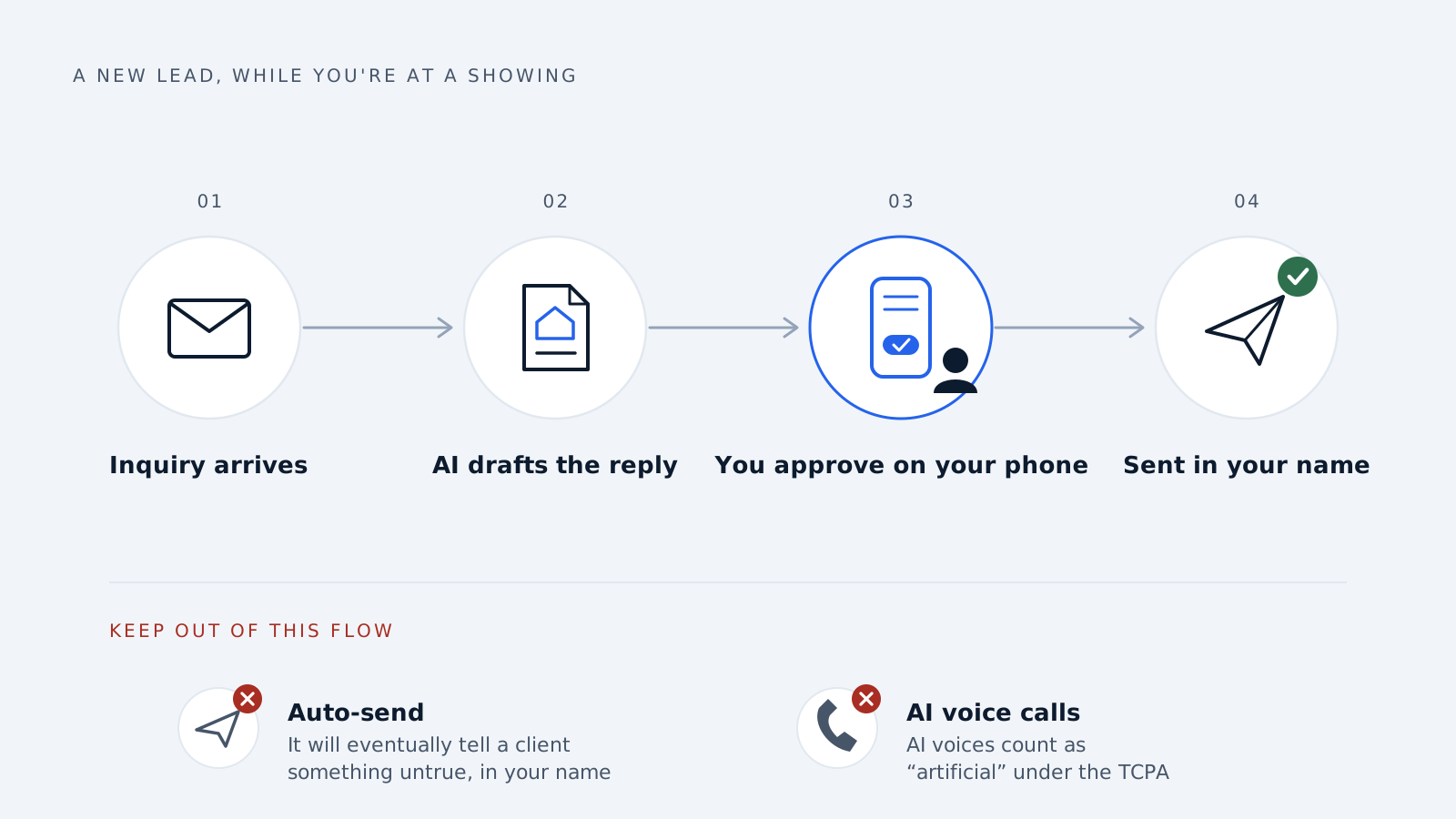
What AI does here: it reads the inbox, writes a first reply with the property details already in it, and waits for you to approve. You send it from your phone between appointments.
Keep it as a draft. If you let it send on its own, it will eventually tell a client something untrue, in your name.
Do not let it make phone calls. On 8 February 2024 the FCC ruled that AI voices count as “artificial” under the Telephone Consumer Protection Act. That law lets people sue you directly, and 26 state attorneys general can enforce it. Companies selling “AI ISAs” demo them by cold-calling bought lists. That demo is the risky part.
Problem 3: you can no longer choose who sees your ads
This one catches people out, because it happened quietly.
In January 2023, Meta settled a fair housing case with the DOJ. It then changed how housing ads work.
| Before | Now |
|---|---|
| Target by age | Not allowed |
| Target by gender | Not allowed |
| Target by ZIP code | Not allowed |
| Special Ad Audiences (lookalikes) | Removed |
| Normal delivery | Meta spreads housing ads evenly across demographic groups |
Real estate advertising ran on those settings. They are gone. What you still control is the ad itself, the offer, and the page people land on.
What AI does here: writes twenty different versions of an ad and a landing page for each listing, instead of one generic ad pointing at your homepage. When you cannot pick the audience, the ad has to find them. Making twenty versions used to cost too much for a nine-deal agent. Now it does not.
One warning. Writing an ad aimed at a type of person is still illegal, even though you are no longer selecting them. “Perfect for young families.” “Great starter home for newlyweds.” “Ideal for empty nesters.” That is the behaviour the rules were written to stop.
Listing descriptions: the thing to start with
This is the easiest win. Twenty minutes of writing becomes two.
The quality depends on what you give it. Put four things in the prompt:
- Real details. Square footage, year built, beds, baths, lot size. Say “quartz counters, white oak floors,” not “updated kitchen.” Include dates of any work done.
- What the buyer is buying, not who they are. “Single-level layout.” “Ten minutes from the hospital.” “Garage fits a workbench.” Never describe a type of person.
- Your MLS’s banned word list, pasted into the prompt. The model follows rules you give it. It knows nothing about rules you don’t.
- A character limit, matching your MLS field.
Then read what comes out.
Ask any AI for a warm listing description and it will often write “great for families.” That phrase is a fair housing violation. The model is not broken. It is writing something that sounds nice, and nice is not the standard here.
OneKey MLS publishes its banned list. It is longer than most agents expect:
| Category | Examples they flag |
|---|---|
| Families and children | “great for families,” “no children,” “newlyweds” |
| Age | “adults only,” “golden agers” |
| Disability | “not suitable for wheelchair” |
| Income source | “no Section 8,” “must be employed,” “verifiable income” |
| Race, religion, nationality | direct references of any kind |
| Other protected groups | sexual orientation, military status |
OneKey tells the agent and the broker, then deletes the wording. If a complaint goes further, it is your name on the listing, not the software’s.
Photos: what you may and may not change
Virtual staging is allowed. Inventing features is not. NorthstarMLS spells out the line:
| You may change | You may not change |
|---|---|
| Furniture | Walls |
| Décor | Flooring |
| Crop, exposure, colour balance | Doors and windows |
| Light retouching | Roof, siding, ceilings |
| Fireplaces | |
| Driveways and grading |
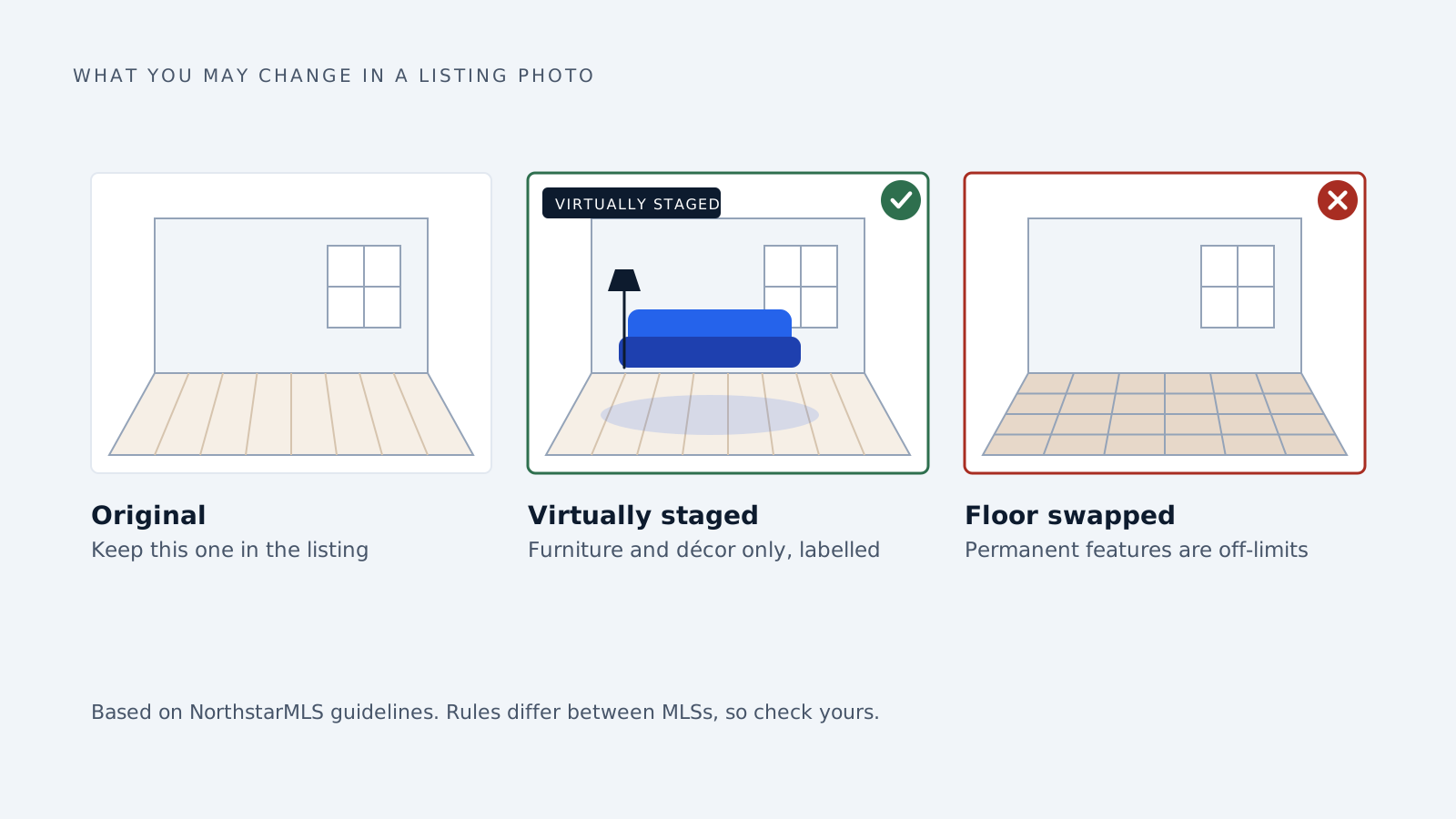
Two more rules from the same guidelines: label the photo as virtually staged or AI-enhanced (in the caption, the filename, or on the image), and include an unedited “before” photo of every room you staged.
Watch the tool. Tell an AI to “brighten and modernise” a kitchen and it may swap the floor without telling you. Compare against the original before you upload.
These are one MLS’s rules. Check yours.
Never use AI to pick people
Drafting and summarising: fine. Choosing between human beings: not fine.
In 2024, SafeRent Solutions paid $2.28 million to settle a class action. Its tenant-scoring software was accused of giving lower scores to Black and Hispanic applicants and to people using housing vouchers, breaking the Fair Housing Act. The lawyers called it the first case of its kind.
So do not use AI to score or rank buyers or tenants, to describe neighbourhoods, or to decide your position in a negotiation. “The software decided” has been tried as a defence and it failed.
What to use it for, at a glance
| Task | Use AI? | The rule |
|---|---|---|
| Listing descriptions | Yes, then check | Fair housing wording |
| Past-client follow-up | Yes, as drafts | Read before sending |
| First reply to a new lead | Yes, as drafts | Read before sending |
| Ad copy and landing pages | Yes | No demographic targeting in the words |
| Summarising comps | Yes | You pick the comps |
| Reading contracts for odd clauses | Yes | Broker still reviews |
| Virtual staging | Yes, with limits | Furniture only, label it, keep a “before” |
| Calling leads with an AI voice | No | TCPA |
| Scoring tenants or buyers | No | Fair Housing Act |
| Describing a neighbourhood | No | Steering |
Getting started
Do listing descriptions for a month. Only that. Check every one against your MLS word list before it goes live.
Keep a note of what AI helped write and how you checked it. If a complaint ever comes, someone will ask what your process was. “I check every description against the banned list” is an answer.
Ask your broker what the firm’s AI policy says. Most firms wrote one in the last two years.
Common questions
What should a solo agent use AI for first? Listing descriptions, then follow-up with past clients. At nine deals a year, the win is keeping old relationships alive, not handling more leads.
Can AI write my MLS listing? Yes. Check it against your MLS’s banned word list before publishing. The listing is yours no matter what wrote it.
Is AI virtual staging allowed? Usually, if you label it. Most MLSs limit it to furniture and décor and want an unedited photo too. Rules differ, so check yours.
Can I use an AI voice to call leads? Treat it as regulated. The FCC ruled in February 2024 that AI voices count as artificial under the TCPA. Get legal advice before you switch one on.
Can AI help with Facebook ads? With the words, not the audience. Age, gender and ZIP targeting were removed for housing ads in 2023. Use AI to write more versions.
Can AI screen tenants? No. That has already cost one company $2.28 million, and the liability lands on whoever uses the tool.
How we write, source and correct our articles:editorial policy.
Related reading

10 Tips for Integrating Generative AI in Your Business
Ten simple tips for using AI tools like ChatGPT in your business, without leaking private information, sending out mistakes or wasting money.

Is AI Replacing CRM? No, Here's What It's Replacing
AI isn't replacing your CRM. It's replacing the manual work around it: data entry, slow lead replies, forgotten follow-ups, and guessing who to call next.

AI Prompts for Conversion Optimization: 8 Prompts to Turn More Enquiries Into Customers
Eight copy-and-paste AI prompts for the moments that win or lose a customer: the first reply, the quote, the follow-up and the lost deal.
Ready when you are
See it read your own sales mailbox
Twenty minutes, on a real mailbox, with no slides. Gmail, Google Workspace, Outlook and Microsoft 365.