Chat With CRM: Where to Find, What to Expect
Chat with CRM means asking your sales data questions in plain English and getting a real answer back. You type “how many deals went quiet this month?” and get a number and a list, not a report to build.
You can find it in four places. Your CRM’s own AI assistant, BI tools, data warehouse tools and sales AI layers all offer some version of it.
This guide covers where to find it, what you can ask, the insights you’ll get, and what to expect before you rely on the answers.
What you can ask, and the insights you get
The value isn’t the chat window. It’s getting answers in seconds that used to take a report request and a few days.
Pipeline health
- “Which deals haven’t had any activity in three weeks?”
- “What’s in the pipeline for this quarter, by stage?”
- “Which big deals moved backwards this month?”
Insight: where deals are stalling, before the quarter is lost.
Conversion and win rates
- “What’s our win rate this quarter compared with last?”
- “At which stage do we lose the most deals?”
- “What’s the win rate on referral deals versus website leads?”
Insight: which stage of your process leaks, and which sources are worth more effort.
Speed
- “What’s our average time from first enquiry to quote sent?”
- “How long do deals sit in the proposal stage?”
- “How many new leads waited more than a day for a reply?”
Insight: where time is lost between steps, which is usually where deals go cold.
Lead sources and quality
- “How many leads came in last month, by source?”
- “Which campaign brought the most deals, not just the most leads?”
- “How many leads were spam or job seekers?”
Insight: where your real buyers come from, as opposed to where the volume comes from.
Customers and products
- “Which accounts bought last year but nothing this year?”
- “Which product gets the most quote requests?”
- “Who are our ten biggest customers by revenue this year?”
Insight: churn risk, upsell targets and real demand by product.
Team performance
- “How many deals did each rep close this quarter?”
- “Who has the most overdue follow-ups?”
Insight: where coaching or rebalancing would help, without waiting for month-end reports.
None of these are hard questions. Each one is a single database query. They take days today only because the person asking can’t write the query.
Where to find chat with CRM tools
| Route | Examples | Best when | Watch out for |
|---|---|---|---|
| AI built into your CRM | HubSpot Breeze, Salesforce Agentforce, Zoho’s Ask Zia, Copilot for Dynamics 365 | You want answers inside the CRM you already use | Often strongest on single records, weaker on analysis across many deals |
| BI tools with plain-English questions | Power BI Copilot, Tableau Agent, Looker, ThoughtSpot Spotter, Qlik Answers | Your CRM data already flows into a BI tool | Needs a well-modelled data layer and someone to maintain it |
| Warehouse AI analysts | Snowflake Cortex Analyst | You have a data team and a warehouse | Can’t update the CRM; setting up the business definitions takes real work |
| An AI layer across CRM and inbox | Specialist sales AI tools | Your questions span CRM, email and forms | Check how it gets its numbers |
Products and features change fast. Use these as places to start, and confirm current features and pricing with each vendor.
Route 1: AI built into your CRM
This is the easiest place to start. Most major CRMs now ship an AI assistant you can ask questions in plain English. HubSpot has Breeze, Salesforce has Agentforce, Zoho has Ask Zia, and Microsoft offers Copilot for Dynamics 365.
They’re good at questions about one record or a short list. “Summarise this account.” “Which of my deals close this month?”
They’re often weaker at analysis across your whole pipeline, such as trends, comparisons and win rates by source. Check that specifically before you buy. Also check the pricing model. AI features are often an add-on, a higher tier or a pool of usage credits.
Route 2: BI tools that take plain-English questions
If your CRM data already flows into a BI tool, you may already have this. Power BI has Copilot, Tableau has Tableau Agent, Google’s Looker has conversational analytics, and ThoughtSpot and Qlik offer their own.
These are stronger at real analysis. The trade-off is setup. Answer quality depends on how well someone has modelled the data underneath, and that someone is usually an analyst or developer.
Route 3: Warehouse AI analysts
Tools like Snowflake Cortex Analyst answer plain-English questions over data in a data warehouse. They’re powerful for deep analysis across many systems.
They need a data team, and they can’t update your CRM. For most small and mid-sized sales teams, this is more than they need.
Route 4: An AI layer across your CRM and inbox
Some sales AI tools connect to the CRM and the inbox and forms around it. That matters when your questions cross systems. “How many quote requests came in by email last month, and how many became deals?” needs both.
Ask these vendors exactly how they calculate their numbers. The next section explains why.
How it works, and why some answers are wrong
A good system works in four steps:
- It reads your question and works out what you want: which records, which time range, what to count.
- It turns the question into a database query. This is often called text-to-SQL.
- The database runs the query against your real records. The counting is exact.
- A model writes the answer as a sentence or a small table.
The model handles language. The database handles maths. That split is the whole design.
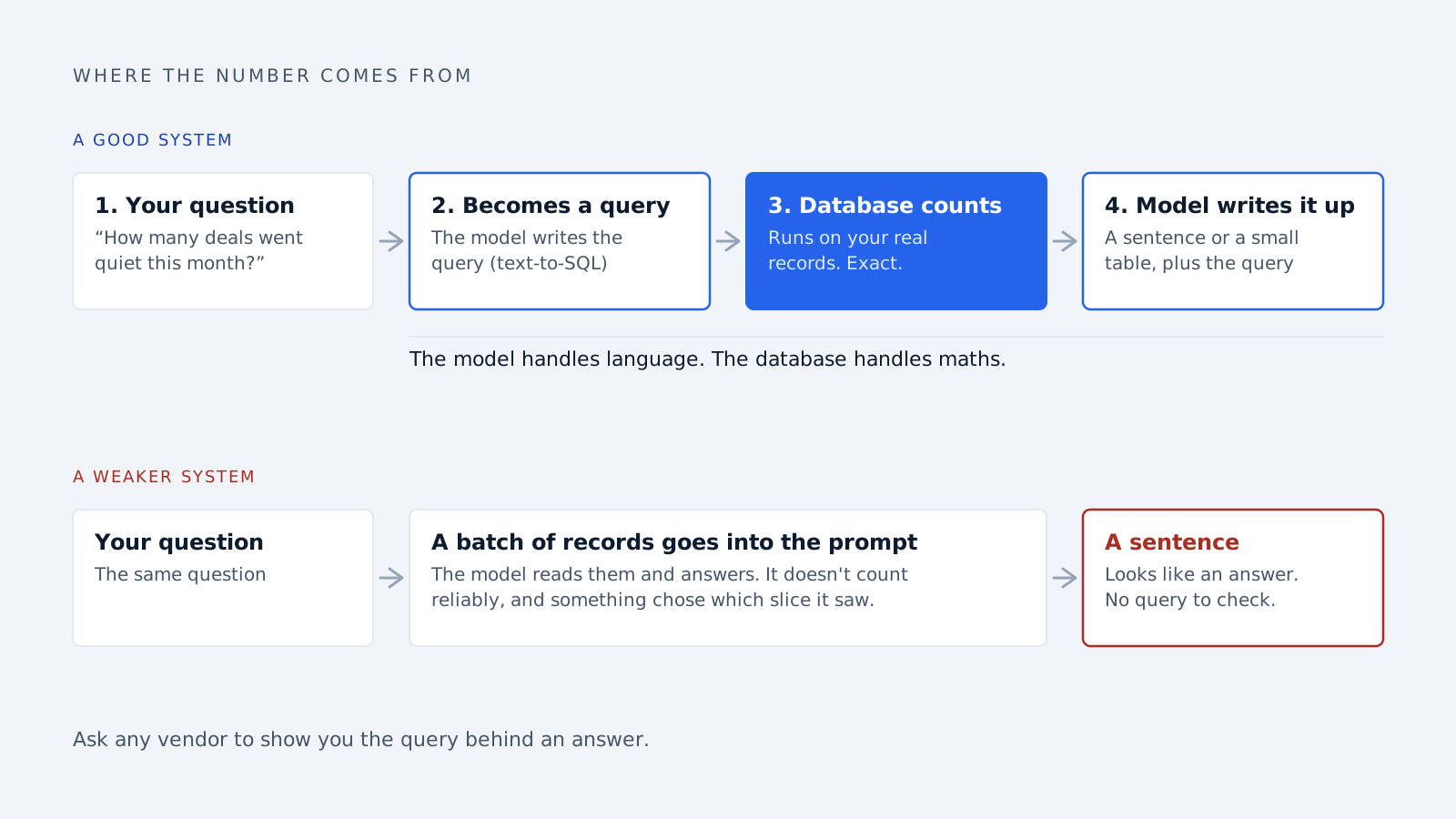
Weaker systems skip step 3. They pull a batch of records, hand them to an AI model and ask it to read them and answer. This demos well and fails in real use, for three reasons.
AI models don’t count reliably. Ask one to total 400 deal values and you’ll get a number that looks right and often isn’t.
Your data doesn’t fit. A CRM with tens of thousands of records can’t go into one prompt. Something decides which slice to include, and if that choice is wrong, so is the answer.
There’s no warning. A broken report looks broken. A wrong sentence looks like an answer.
Ask any vendor to show you the query behind an answer. If they can’t, be careful.
What to expect
Accuracy depends on your definitions
The hard part isn’t the query. It’s knowing what your words mean.
When you say “closed,” do you mean Closed Won only? When you say “last month,” is that the calendar month or your fiscal one? When you say “active customer,” how recent does the last order need to be?
Good tools let you record these definitions once. This is often called a semantic layer. It makes a real difference. Snowflake reported that adding one lifted the same AI model’s accuracy on a public text-to-SQL benchmark from 57% to 78%. That’s a vendor’s own test, but the direction matches what teams see in practice.
Answers are only as good as your data
If reps don’t log calls, “which deals went quiet?” really means “which deals have no logged activity?” The tool can’t see what was never recorded.
Permissions need to carry over
A rep asking “what’s the biggest deal in the pipeline?” shouldn’t see accounts they’re not allowed to see. The tool should run each question with the asking person’s permissions, not as an admin with access to everything.
Setup
CRM-native assistants can be switched on quickly. The real work is agreeing your definitions and cleaning the fields people will ask about. BI and warehouse routes take longer and need technical help.
Cost
Expect AI features to sit in a higher plan, an add-on or a usage-based credit pool. Usage pricing is hard to predict, so ask what a heavy month would cost.
The first month
Expect some wrong or unclear answers early on. Each one usually points to a definition nobody agreed or a field nobody fills in. Run the tool next to a report you already trust, and compare.
What it can’t tell you
Why something happened. It can show win rate fell last quarter. It can’t tell you a competitor cut prices in March.
Anything that isn’t in the data. Phone calls nobody logged, conversations in personal inboxes, deals tracked in spreadsheets.
Reliable forecasts on request. Some tools will predict next quarter if you ask. Treat that as an estimate and check what it’s based on.
Questions your business never defined. If nobody decided what “enterprise account” means, no tool can count them.
How to judge a tool before you buy
- Does it show the query behind each answer? If you can’t see how it got a number, you can’t check it.
- How does it learn your definitions? “It figures it out” means confident wrong answers.
- What does it do when it’s unsure? It should ask or say so, not guess.
- Does it respect your CRM permissions? Ask for a demonstration, not a promise.
- Can it match a report you trust? Run both for a few weeks. Any gap is a bug or an unclear definition.
Frequently asked questions
What does chat with CRM mean? It means asking questions about your sales data in plain English and getting a direct answer, instead of building a report or asking an analyst. A good system turns your question into a database query and runs it against your CRM records. Then it writes the result as a short sentence or table you can act on.
Where can I find chat with CRM tools? Start with your CRM’s own AI assistant, such as HubSpot Breeze, Salesforce Agentforce, Zoho’s Ask Zia or Copilot for Dynamics 365. If your data already sits in a BI tool, Power BI, Tableau, Looker and ThoughtSpot offer plain-English questions too. Specialist sales AI layers cover questions that span your CRM and inbox.
What insights can I get by chatting with my CRM? You can find stalled deals, compare win rates by source and stage, and measure time from enquiry to quote. You can also spot customers who stopped buying, see which products get the most requests, and track each rep’s follow-ups. Each answer takes seconds instead of a report request.
Is chat with CRM accurate enough to trust? For straightforward counts and totals, yes, if the tool runs real database queries and knows your business definitions. Accuracy drops on vague questions and on tools that let an AI model read records and guess. Check early answers against reports you already trust before using them for decisions.
Do I need a data warehouse to chat with my CRM? No, not for questions about CRM data alone. CRM assistants and many sales AI tools work on the CRM directly. You’ll want a warehouse later if your questions combine the CRM with billing, support or other systems, and you have someone to manage it.
Will it replace our dashboards? No. Dashboards are better for numbers you check every week, because a glance is faster than typing. Chatting with your CRM is better for the one-off question nobody built a report for. Most teams end up using both, each for different moments.
How Delynt fits in
Delynt’s business intelligence layer works on the principle above. Your question becomes a query against your real CRM and inbox data, the database does the counting, and a model only phrases the answer. That’s why the numbers match your records.
It connects to the CRM and inbox you already use. See CRM integrations for what connects today.
Start by writing down your questions
Before you look at any tool, spend ten minutes listing the questions your team asks that currently need someone to build a report. Most teams find the same six or seven coming up again and again.
That list is your test for any tool. It also shows you which business definitions your team has never agreed.
If you’d like to see those questions answered from your own pipeline, talk to us.
How we write, source and correct our articles:editorial policy.
Related reading
BI as a Service (BIaaS): What It Is, Who It's For, and How to Choose a Provider
BI as a service means an outside provider runs your reporting on a subscription. What it costs, who should skip it, and seven questions to ask a provider.
How to Train an AI Model for Your Mid-Sized Company's Sales Team
Training AI for sales means teaching a capable model your buyers, playbook and data, not building one from scratch. Six practical steps for mid-sized teams.
Is AI Replacing CRM? No, Here's What It's Replacing
AI isn't replacing your CRM. It's replacing the manual work around it: data entry, slow lead replies, forgotten follow-ups, and guessing who to call next.
Ready when you are
See it read your own sales mailbox
Twenty minutes, on a real mailbox, with no slides. Gmail, Google Workspace, Outlook and Microsoft 365.